Participant
May 8, 2022
Question

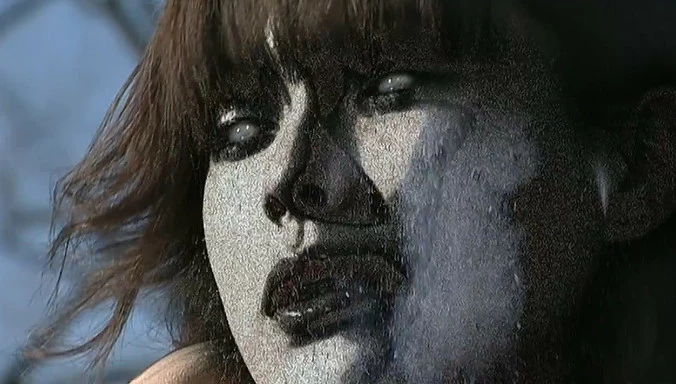
how can I make effect like this

  • May 8, 2022
  • 2 replies
  • 554 views


Hi. I want to make a phtoshop like this picture, but I don't know which texture or effect. Please help me


This topic has been closed for replies.

2 replies

Chris 486
Community Expert
Community Expert
May 8, 2022

Hello!


I would recommend looking for tutorials of how to make the texture you want on youtube something like this:

How To Make Stone Texture in Photoshop | Rock Texture | Photoshop Tutorial (Easy) - YouTube


Dave mentions great tips on how to get the texture to looks as if it's wrapping around the figure. This tutorial may helps as it will help teach you how to blend your texture to the figure as well.

How to Remove a Tattoo in Photoshop - YouTube


Hope that helps!


davescm
Community Expert
Community Expert
May 8, 2022

Add a texture above the image and make a mask in the shape of the face. Try different blending modes and opacity settings to blend the texture layer with the image which will help keep some of the shadow detail. You may also need to warp and distort the texture so it looks as if it wraps on the skin.


Dave