Known Participant
November 14, 2018
Question

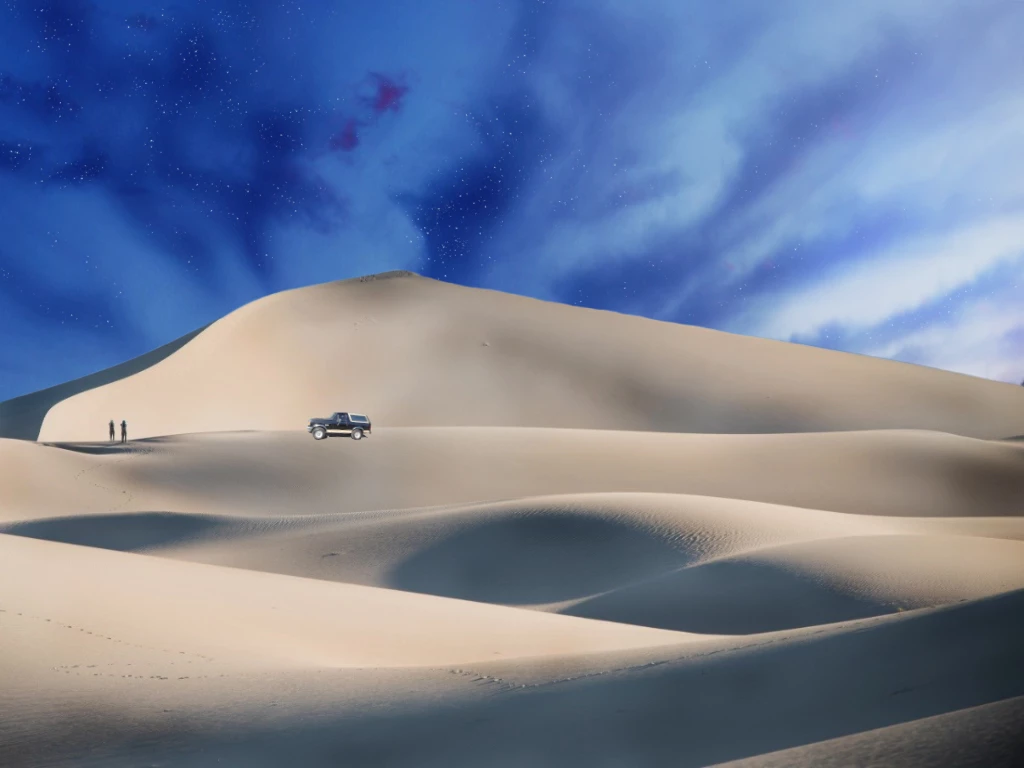
how can I make this more realistic

  • November 14, 2018
  • 3 replies
  • 574 views

this it the first project ive ever used ps for... how can I make it more realistic? please...criticize me... tell me how to make this go from good too amazing.
This topic has been closed for replies.

3 replies

Legend
November 14, 2018

My suggestion: think what the story is. People like to tell themselves a story when they look at art.

Where did the people come from? Where did the car come from? You can show this part of the story with tracks. The missing tracks make the people look like statues and the car dropped by a helicopter - or added with Photoshop. If it is day, there should be shadows: the length of the shadows will tell the time of day.  The human figures are identical - why? Are they dancing?

From a composition point of view, the centre of a picture is key. People look there first. They find: a pool of darkness. Is that part of the story? If it's an accident, consider rearanging so the people OR the car (whichever you want to be the hero) is there. If they are equally important they could be opposite sides of the centre.

Trevor.Dennis
Community Expert
Community Expert
November 14, 2018

You have to ask how it got there?  Unless it was dropped by helicopter, it would have left some tire marks. We do imprints using Bevel & Emboss with Fill Opacity set to zero.  Plus some inner shadow.

Shadows are always crucial with composites.  We can see the brighter sky to the right, and we have some shadow/highlight clues on the dunes, so we try and replicate that with direction, softness and opacity.

BTW, I took your truck out, and put in a new one, because it is a zillion times easier to do this stuff with everything on its own layer.

Your truck was too light on what should be the shadow side.

davescm
Community Expert
Community Expert
November 14, 2018

Hi

A few suggestions:

1. Tone down the sky - it is unrealstically saturated - take a look at some sky photos *

2. Blur the sharp edges on the background dunes. Those in the foreground are sharp, the midground are softer therefore the background should be softer still

3. Look at the lighting on the car - it does not match the right/back lighting on the dunes. Same with the shadow.

* One other thing your photo was posted with no colour profile. When saving for web use - always export and Convert to sRGB and check the box to embed color profile. That way we can see the same colours you are seeing (assuming your monitor is correctly profiled).

Dave

Trevor.Dennis
Community Expert
Community Expert
November 14, 2018

Dave, I am thinking that as this is a night shot, that is why the sky is so saturated, and the dunes so unsaturated.  Or perhaps it would be truer to say that the dunes natural yellow colour has been countered by the blue moonlight.  There are no star trails, but if a very wide lens was used, it might still have been a long exposure.  Just a thought.

davescm
Community Expert
Community Expert
November 14, 2018

Hi Trevor

You could be right - if that is the case I would be tempted to desaturate the sky and give it a little more contrast

Dave