Participant
July 13, 2017
Answered

How can I rename a adjustment layer or fill layer while creating it?

  • July 13, 2017
  • 3 replies
  • 1125 views

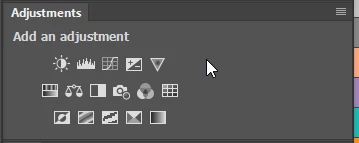
Is pressing  ALT while  clicking  this icon? 

I know when I want to rename a  layer  while creating it  , I  should press ALT. (It works.)

But it won' work when I  want to  create an  adjustment layer or  a  fill layer. When I press ALT  and click  this icon   ,the pop menu won't show.

Windows 10  x64

Can someone help? I know we can rename a adjustment layer or fill layer while creating it. But how?  thx
    This topic has been closed for replies.
    Correct answer Trevor.Dennis

    I have a feeling that very few people use that icon to open adjustment layers.  If you use the Adjustment Layer panel instead, then Alt clicking works.

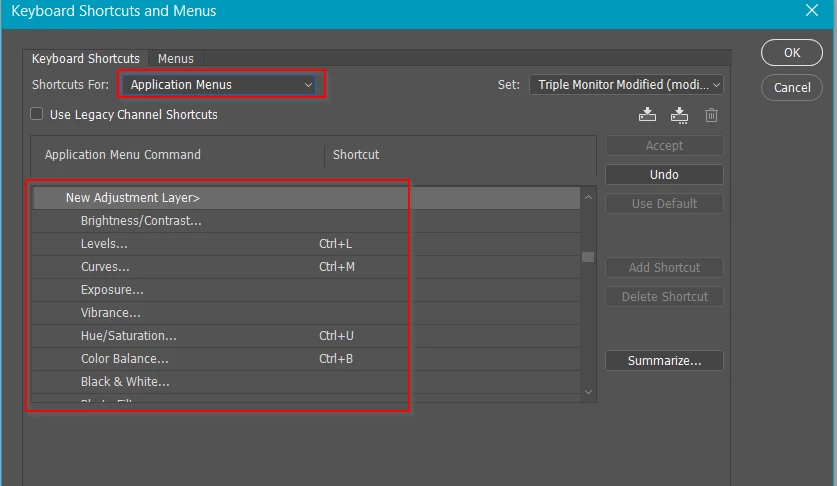
    Another approach is to set the Image Adjustment shortcuts to Adjustment Layers instead of the default, applying directly to the layer.  Most of use Adjustment layer far more than direct adjustments after all.  Setting your shortcuts like below will default to opening the naming dialog with the Adjustment Layer.

    3 replies

    Trevor.Dennis
    Community Expert
    Trevor.DennisCommunity ExpertCorrect answer
    Community Expert
    July 13, 2017

    I have a feeling that very few people use that icon to open adjustment layers.  If you use the Adjustment Layer panel instead, then Alt clicking works.

    Another approach is to set the Image Adjustment shortcuts to Adjustment Layers instead of the default, applying directly to the layer.  Most of use Adjustment layer far more than direct adjustments after all.  Setting your shortcuts like below will default to opening the naming dialog with the Adjustment Layer.

    Participant
    July 13, 2017

    Thx, your advice is very useful.

    BTW,  when I do the same  operation on the other PC, it works.  I think there is a software conflict or something on that PC.

    tmyusuf74
    Inspiring
    July 13, 2017

    Double click on the icon. What's result come out?

    c.pfaffenbichler
    Community Expert
    Community Expert
    July 13, 2017

    Have you tried alt-shift?

    Participant
    July 13, 2017

    Strangely , when I do the same  operation on the other PC, it works.  Now I  doubt that might be a software conflict or something.