
garyh68146820
Participant
February 6, 2017
Answered

How can I save my preference for curves to always keep the TAT tool turned on?

  • February 6, 2017
  • 2 replies
  • 398 views

I use curves a lot, and I like the TAT tool. I find I often have to stop and turn it on, although I have previously indicated my preference to keep it on. How can I keep it turned on?
    This topic has been closed for replies.
    Correct answer Trevor.Dennis

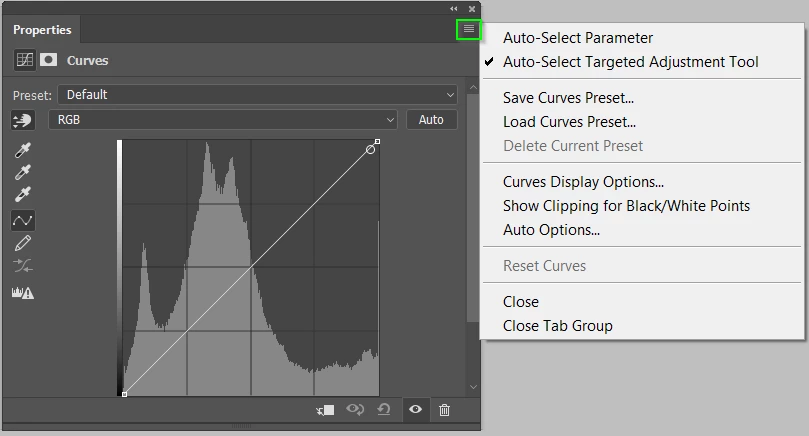
    Hi Gary.  You can select that option from the Curves fly-out menu in the top right corner.  Once that option is checked, Curves will always open with the TAT enabled.  It doesn't sound much of a time saver, but it is the sort of thing that smooths out your workflow, and it all adds up.

    2 replies

    garyh68146820
    Participant
    February 6, 2017

    Photoshop. Sorry, I thought this was a Photoshop forum.

    [Here is the list of all Adobe forums... https://forums.adobe.com/welcome]

    [Moved from generic Cloud/Setup forum to specific Program forum... Mod]

    Trevor.Dennis
    Community Expert
    Trevor.DennisCommunity ExpertCorrect answer
    Community Expert
    February 7, 2017

    Hi Gary.  You can select that option from the Curves fly-out menu in the top right corner.  Once that option is checked, Curves will always open with the TAT enabled.  It doesn't sound much of a time saver, but it is the sort of thing that smooths out your workflow, and it all adds up.

    garyh68146820
    Participant
    February 7, 2017

    I know about that, but it only seems to work some of the time. Can it be locked?

    Gary

    kglad
    Community Expert
    Community Expert
    February 6, 2017

    what program?