

How can I tell if a tiff was saved with "interleaved" or "per channel" for pixel order?
My PLATFORM:Macintosh
SCRIPTING LANGUAGE:I only know Applescript
Photoshop version: CS5
I need to look at a large amount of tiffs and determine if any of them were saved with the option in the second dialog box that comes up where it asks if you want to save the pixel order as interleaved or by channel.
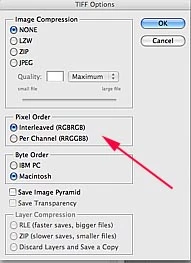
I need all of them to be interleaved and some are not.
I would rather not open every image and resave. If I could run a script that would identify the culprits by changing their label to red for instance then I could deal with just those files.
If there was a way I could look at them without opening in photoshop that would be better but even opening in photoshop I get I don't seem to see the pixel order info anywhere.
My PLATFORM is
Macintosh
SCRIPTING LANGUAGE
I only know Applescript
Photoshop version CS5
 AdChoices