
Known Participant
November 16, 2016
Answered

How can I view PSB thumbnails in Bridge CC 2015?

  • November 16, 2016
  • 2 replies
  • 1971 views

I'm working on a project and need to see all the images I'm working on side by side. They're all PSBs created in PS CC 2015. None of these thumbnails are coming up in Bridge. Any suggestions?

I haven't upgraded to CC 2017, because I'm working on a deadline and don't want to create any new problems right now. I'm on a Mac OS 10.11.6.

Thanks in advance!
This topic has been closed for replies.
Correct answer gener7

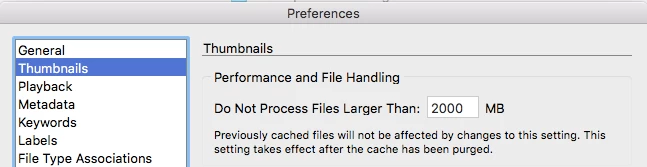
Bridge will not render thumbnails past a certain File size.  Default is 1 GB

Change it here in Preferences, and note you will have to purge Bridge's thumbnail cache for it to take effect.

Preferences > Cache > Purge All Cache now.

2 replies

gener7
Community Expert
gener7Community ExpertCorrect answer
Community Expert
November 16, 2016

Bridge will not render thumbnails past a certain File size.  Default is 1 GB

Change it here in Preferences, and note you will have to purge Bridge's thumbnail cache for it to take effect.

Preferences > Cache > Purge All Cache now.

R HuberAuthor
Known Participant
November 16, 2016

That did it gener7. Thank you so much!!!!

gener7
Community Expert
Community Expert
November 16, 2016

And before I forget, you can install CC 2017 and keep 2015.5 for backup.

When you click on Update, click on Advanced and uncheck the option to remove previous versions, then Update.

JJMack
Community Expert
Community Expert
November 16, 2016

I would think that it should. On windows I saved a small image as a Large Document Format .PSB file.  Adobe Bridge CS2, CS6, CC, CC 2015, and CC 2017 all displayed the .psb file thumbnail.

JJMack