Participant
February 26, 2019
Answered

How can I view the gray background instead of onion skin on a PNG?

  • February 26, 2019
  • 3 replies
  • 1049 views

Hello,

I am working with a white png, and the white and gray onion skin is making it difficult to see it.

Is it possible to get rid of the onion skin so that Photoshop only shows the gray background?
This topic has been closed for replies.
Correct answer JJMack

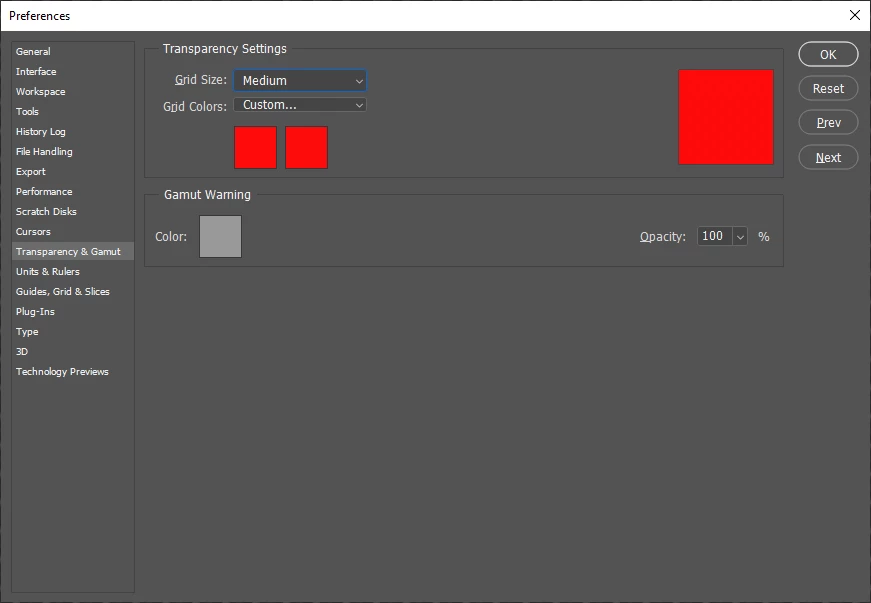
Make it any color you want for example red

3 replies

JJMack
Community Expert
JJMackCommunity ExpertCorrect answer
Community Expert
February 26, 2019

Make it any color you want for example red

JJMack
Leslie Moak Murray
Community Expert
Community Expert
February 26, 2019

If you mean the gray checkerboard background:

Edit/Preferences/Transparency & Gamut / Transparency Settings/ Grid Size: choose "None" and it goes away.

The background will be white, though, not gray.

c.pfaffenbichler
Community Expert
Community Expert
February 26, 2019

Could you please post a screenshot to illustrate what you are talking about?