Participant
January 16, 2018
Question

How Could I Replicate This?

  • January 16, 2018
  • 3 replies
  • 254 views

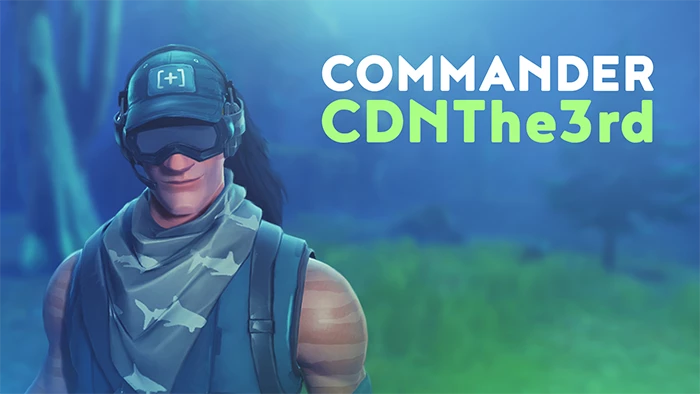
Hi, I'm new here and didn't know where else I could get help related to this but I just want to know what kind of filters and stuff I would have to apply in photoshop to get this look, I can see it has a slight blur and stuff, Would be awesome if anyone could help me out. I'm really familiar with Photoshop. Thanks
This topic has been closed for replies.

3 replies

Trevor.Dennis
Community Expert
Community Expert
January 16, 2018

Looks like a computer game character, which will be animated and rendered in 3D, so however they make those characters.  If I had to do a still image of it, then like Dave says.  Lots of layers and clipping masks.  I like to draw outlines with the Pen tool so I can fine tune them, and then stroke or fill the path when it looks right.  I keep all my paths, so can use them again like layers. 

For highlights I paint in with white, or stroke the same paths, and then blur the highlight and clip to the layer being highlighted.  The fact is, there are quite a lot of techniques involved, and it is not going to be easy for a beginner with Photoshop, even if you have good drawing skills.

davescm
Community Expert
Community Expert
January 16, 2018

Hi

There are many ways to do this, including 3D modelling or 2D painting.

For 2D painting build it up in layers. You can achieve nice sharp edges on an area  if you create a custom shape then clip the painted layer(s) to it by Alt-Clicking on the border between two layers in the layers panel. That way you can use soft brushes but the paint will be restricted to the shape and keep a nice edge as in the example below

I don't see a massive use of filters - perhaps a bit of blur on the background.

Dave

andreamaestri
Participating Frequently
January 16, 2018

Hello Clink0​! Welcome to the Adobe Forums, If you want discover different blurs on Photoshop, I suggest to give the Blur Gallery a go! You can find out more here : Use the Blur Gallery in Photoshop also a simpler version is here: Add creative blur to photos | Let me know if this helps!