
Jonhaywooduk
Participant
November 20, 2017
Answered

How do I change the SAVE AS default to PSD not TIF ?

  • November 20, 2017
  • 4 replies
  • 9508 views

In the previous version of Photoshop, the default format for SAVE AS was PSD; perfect as I like to post produce, save as PSD then export to JPG. If I need to go back and tinker, I can do as all the detail is preserved in the PSD layers.

However the default in CC2018 seems to be TIF and I'd like to make the default PSD.

Any hints?
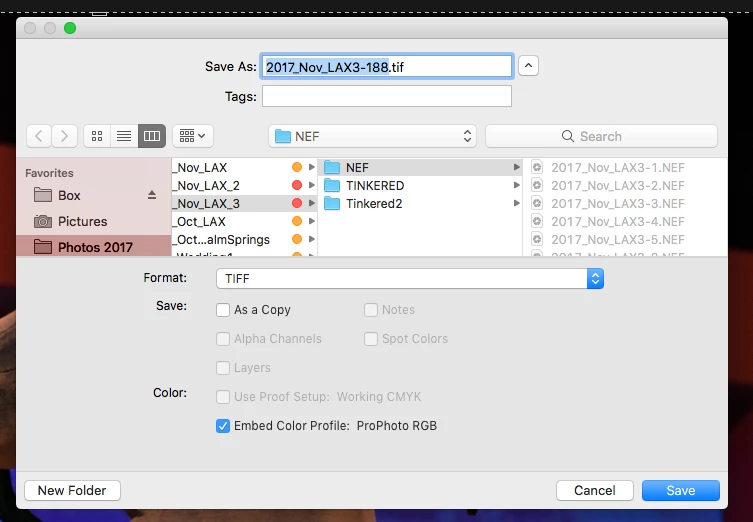
This topic has been closed for replies.
Correct answer D Fosse

It seems you're working with raw files - if these come from Lightroom the default there is TIFF. Change it to PSD in Lightroom preferences.

4 replies

Jonhaywooduk
Participant
February 28, 2021

Amazing....there was me thinking Photoshop preferences was the solution! lol

Participant
December 2, 2018

D. Fosse, remind to buy you a beer next time you're in the Liège area. Been searching days after this trick, which everyone looks for in Ps while it's hidden in Lr... . Great stuff! Thx

Jonhaywooduk
Participant
November 20, 2017

Amazing....Sifting through Photoshop settings was my red herring.

Participating Frequently
May 18, 2018

Agree: I dont know how long id I'd have gone round and round the PS menu before I read this!

D Fosse
Community Expert
D FosseCommunity ExpertCorrect answer
Community Expert
November 20, 2017

It seems you're working with raw files - if these come from Lightroom the default there is TIFF. Change it to PSD in Lightroom preferences.

Participating Frequently
October 17, 2018

You're amazing. Thank you.

You've turned my frustration into joy.
You rock!