Answered
How do I create a color?
I want to create a color that has the following properties:
red: 1
green: .478431
blue: 1
alpha: 1
How do I do that in the Photoshop CC 2018?
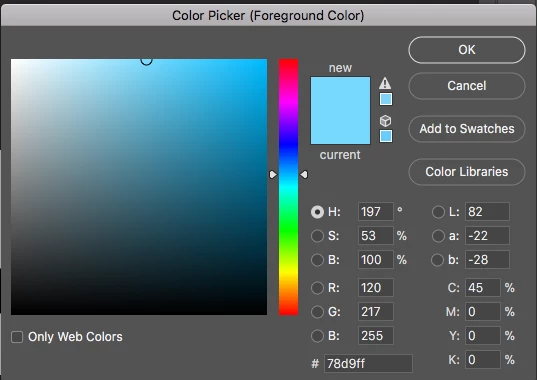
I want to create a color that has the following properties:
red: 1
green: .478431
blue: 1
alpha: 1
How do I do that in the Photoshop CC 2018?
This all seems unnecessarily complicated. The common way we see RGB colour values from 0 to 255 is wrong by every colour science. Colour values are actually in the range 0 to about 1. It so happens that in an 8 bit image that pixel values are in the range 0 to 255 And it’s become a common but wrong way to talk about colour values.
It’s rather bizarre that in the same breath we talk about CMYK values as being in the range 0 to 100, since they are also actually in the range 0.0 to 1.0, and stored in an 8 not image as 0 to 255.
Anyway if you have correct colour values in the range 0 to 1, but have to use a colour picker in the range 0 to 255, just multiply your colour values by 255.0. Job done, no need to convert to 32 bit, imagine they must be XYZ (no!) or do anything else.
Already have an account? Login
Enter your E-mail address. We'll send you an e-mail with instructions to reset your password.
 AdChoices