I'm designing a blanket that will be covered with a child's name. I'd like to find an easy way to automate this so I'm not typing and retyping names every single time.
This might not be possible with Photoshop patterns, because even though you can create a pattern out of text, unless I’m missing something it’s not really possible to edit the pattern text and have the applied patterns update. I tried it with a text Smart Object that was used to define a pattern, and when I edited the text layer in the Smart Object, the text in the pattern it was based on did not update. I think this might be because Photoshop flattens the selection that becomes a pattern.
If you have access to Adobe Illustrator, consider doing this in that instead. Illustrator has more powerful tools for both making and editing patterns; see the demo below. I was able to create an Illustrator pattern based on a text layer, and near the end of the demo you see that it’s possible to edit the text in the pattern and have the entire pattern update. In Illustrator it’s also easier to set up the pattern interactively, as I was able to edit it many ways in the Pattern Options panel. In Photoshop, the Pattern Fill options and View > Pattern Preview have fewer options, so there are more manual steps.
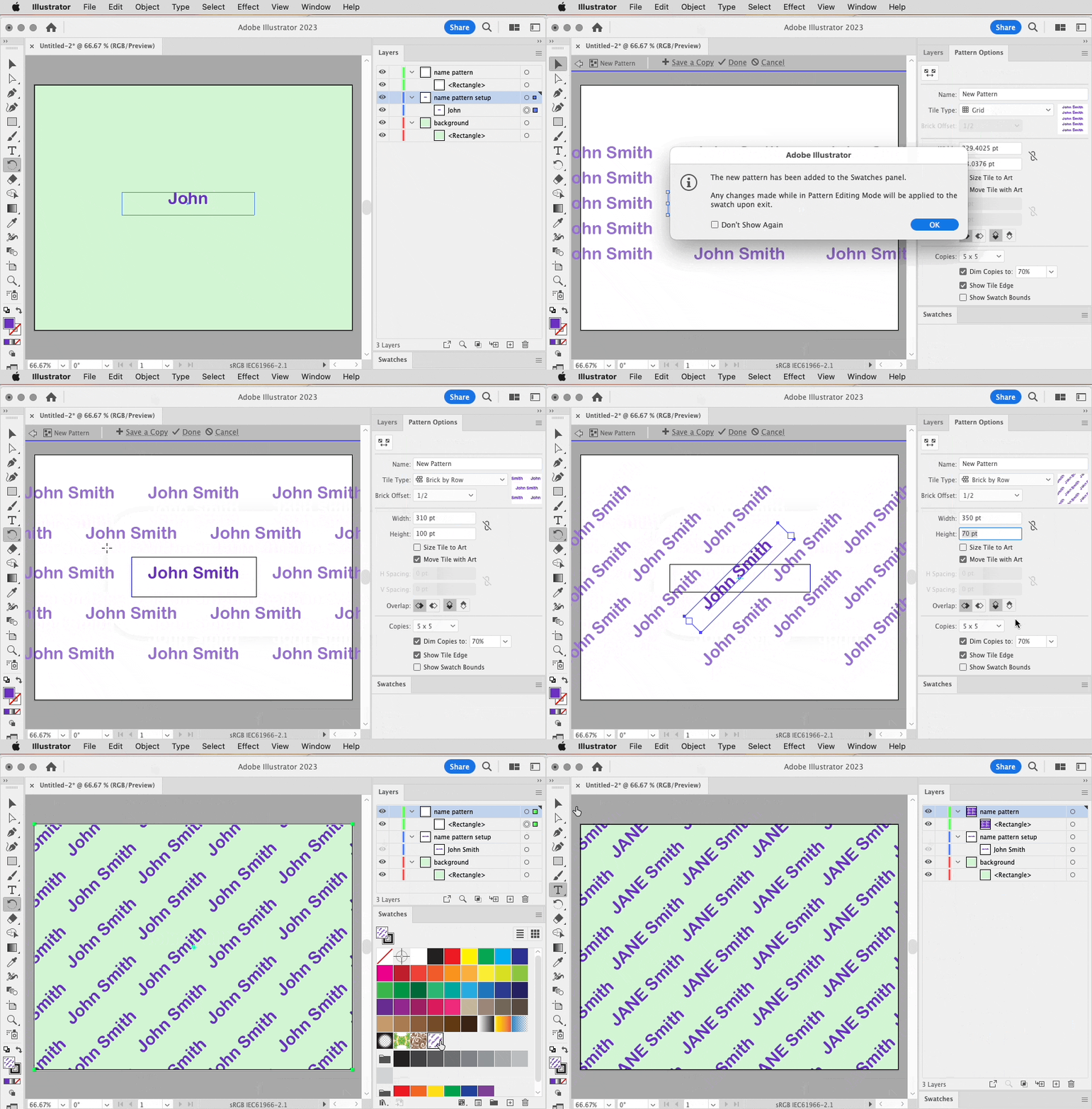
If your final graphic must be produced in Photoshop, remember than you can add an Illustrator file to a Photoshop document as a Smart Object for editing flexibility.


 AdChoices