
Participant
August 9, 2020
Answered

How do I disable Autosave on Adobe Photoshop (2020)

  • August 9, 2020
  • 4 replies
  • 8805 views

It's not that I don't enjoy the Autosave- its that I have no room on my C drive to save them, which is where it made me install the creative cloud portal and is where everything is saving. I either need a way to change the autosave to the D drive or to disable the autosave.

I can't clear out my C drive because its practically bare bones, and I can't get a bigger C drive for a couple months at least, at the moment i have less then a gig on by C drive due to adobe constantly autosaving to the C drive.

Love the product overall but this issue is making it unusable for me.
This topic has been closed for replies.
Correct answer JJMack

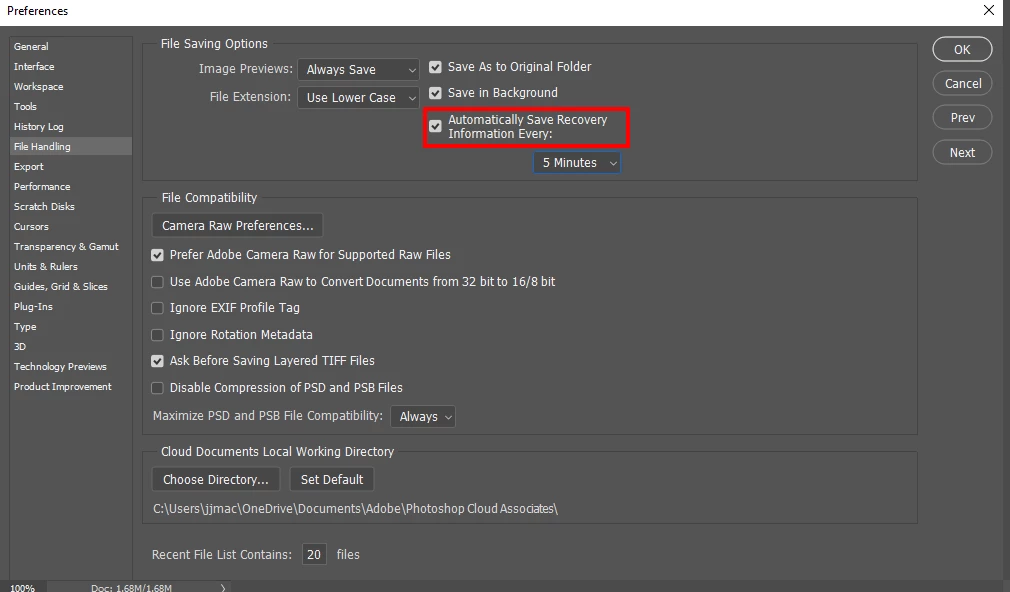
Do you mean auto recovery? if so uncheck it. If you doe not have free space on your boot disk you need to free up some if you want your operating system to run well.

4 replies

c.pfaffenbichler
Community Expert
Community Expert
December 4, 2021

Edited: Had overlooked that this is an old thread. 

Participant
December 4, 2021

Same issue, all solutions worked, but man, you got lectured on your hard drive storage issues. Signed up just to say this. 


Nancy OShea
Community Expert
Community Expert
August 9, 2020

You can't possibly expect to work with less than 1 GB of free HD space.  That's not just ridiculous, it's impossible.  Every computer needs ample HD space to perform routine processes. 


  • Uninstall all non-essential software. 
  • Move work files to external drives.  A Seagate 1TB external HD on Amazon costs less than $50.
  • Use your external HD as your Photoshop Scratch Disk.
  • Move your Creative Cloud Files folder to another drive. Open CC Desktop App.  Click on Preferences (gear icon).  See screenshot below.
  • Defragment your non-SSD drives.


For future reference,  please ensure your computer meets or exceeds the minimum system requirements to run Creative Cloud + all other apps you intend to use. Check each one. Keep in mind that operating systems like Catalina  require 4 GB of RAM and 12.5 GB of primary HD storage.
https://helpx.adobe.com/creative-cloud/system-requirements.html


Recommended Photoshop Workstation

https://www.pugetsystems.com/recommended/Recommended-Systems-for-Adobe-Photoshop-139/Hardware-Recommendations


Nancy O'Shea— Product User & Community Expert
JJMack
Community Expert
JJMackCommunity ExpertCorrect answer
Community Expert
August 9, 2020

Do you mean auto recovery? if so uncheck it. If you doe not have free space on your boot disk you need to free up some if you want your operating system to run well.

JJMack