
TomHu
Inspiring
January 4, 2019
Pregunta

How do I disable updates for CS6 in Creative Cloud?

  • January 4, 2019
  • 3 respuestas
  • 3656 visualizaciones

Hi, I purchased CS6 years ago as a standalone application. I recently upgraded to Photoshop CC 2019, but still have CS6 installed on my computer and would like to hang on to it.

But the Creative Cloud app keeps showing an update for CS6. When I attempt to update, I get this error:
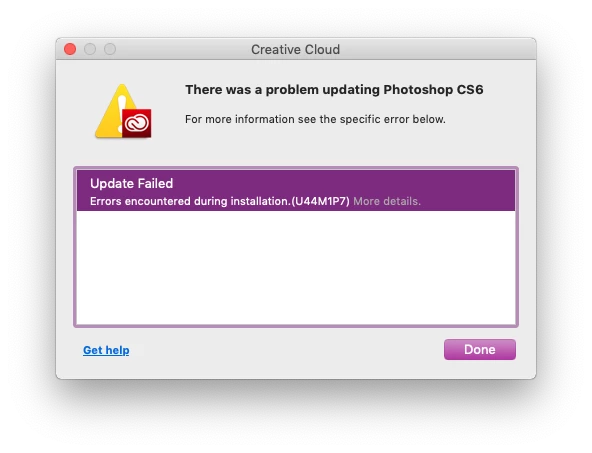
I'm not interested uninstalling the version of CS6 I have to get the CC version of CS6, so I'd just like to disable the updates for CS6 so the CC app isn't constantly telling me I have 1 Update available and automatically trying to update it. Is there a way to do this?

Este tema ha sido cerrado para respuestas.

3 respuestas

andreamaestri
Participating Frequently
January 4, 2019

You can try to manually update it if helps! Update Photoshop CS6 from 13.0.4 to 13.1.x

JJMack
Community Expert
Community Expert
January 4, 2019

Creative cloud broke my CS6 perpetual install and CS6 updates always failed after that.  I fixed that problem by installing CS6 on top of CS6 the broken CS6 which reported itself as version 13.0.  This install Back leveled CS6 to a working version 13.0 and then the CS6 updates worked.  However I no longer have Perpetual CS6 Standard Windows version 13.0.1.3 instead I now have Creative Cloud CS6 extended version 13.1.2.    Some extension that worked in CS6 perpetual do not work in creative cloud CS6 and a  Scripting Bug I reported is fixed in creative cloud CS6 but not in Perpetual CS6.

There are three CS6 versions Perpetual CS6 Windows version 13.0.1.3.  Perpetual CS6 Mac version 13.0.6 and Creative Cloud version 13.1.2

JJMack
Daniel E Lane
Inspiring
January 4, 2019

In your Creative Cloud window, in the upper right corner are three dots. Click there and go to Preferences. CLick on Creative Cloud across the top of that page. at the very bottom, un-check "Enable Auto -Update". that should fix it

D Fosse
Community Expert
Community Expert
January 4, 2019

That setting in the CC desktop app applies to the CC desktop app itself.

The main CC applications are never auto-updated. You always have to initiate the update manually. But you will get notifications, which can be annoying.