
danielg50178951
Known Participant
October 11, 2018
Question

How do I fix the perspective while preserving the proportions

  • October 11, 2018
  • 8 replies
  • 1197 views

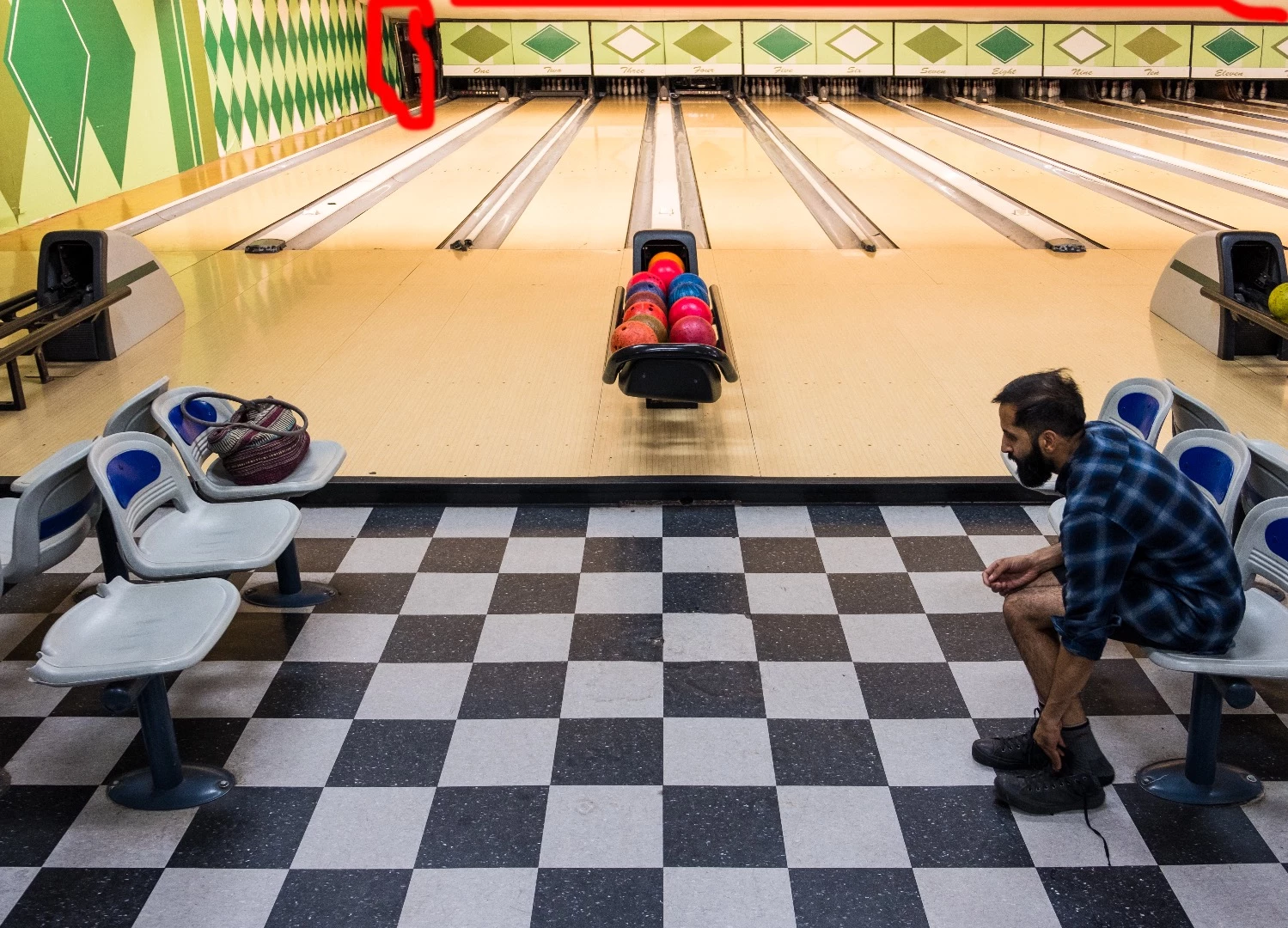
The vertical line on the left with the red circle should be perpendicular to the horizontal plane beneath it, but instead it's leaning left, which is unnatural. I've tried making it vertical with the different perspective tools but that always results in radically changing the dimensions of the image. How would you guys tackle this?
    This topic has been closed for replies.

    8 replies

    Trevor.Dennis
    Community Expert
    Community Expert
    October 11, 2018

    You can do a local repair with Perspective Warp, but it leaves the reflections wrong

    D Fosse
    Community Expert
    Community Expert
    October 11, 2018

    This will work just fine as Gernot describes it. Correct the uprights with Distort, aided by guides or grid - then scale vertically to bring proportions back. Just stop when the tiles look square.

    Yes, you lose some pixels in the final image, but you won't lose definition. You could go the other way, dragging the lower part outwards instead of the upper part inwards, but that involves upsampling which is usually best to avoid. Or you could compromise and do both.

    Chuck Uebele
    Community Expert
    Community Expert
    October 11, 2018

    Not to mention that that area you circled looks like it's not vertical to begin with, so trying to correct something that isn't plumb is going to be a real issue without messing up the rest of the photo.

    War Unicorn
    Community Expert
    Community Expert
    October 11, 2018

    In addition to what others have said, it's a give-and-take, nature-of-the-beast thing when it comes to images like this (or have the right lens like Semaphoric​ mentioned), i.e., correct the perspective and you'll more than likely need to crop. I like it as is as well.

    Chuck Uebele
    Community Expert
    Community Expert
    October 11, 2018

    I use Camera Raw's transform tool shift-T. Clicking on the last icon on the right allows you to draw line on the image to what you want vertical or horizontal.

    Inspiring
    October 11, 2018

    CS6: Select All > Edit > Transform > Distort (not Perspective)

    Move corners and adjust by appearance.

    The correct scales sx, sz and the correct proportion sz:sx cannot be found automatically.

    One would need gauges in the image: preferibly equal lengths Lx=Lz for the proportion and known

    lengths Lx and Lz for accurate scales sx, sz.

    Best regards --Gernot Hoffmann

    Semaphoric
    Community Expert
    Community Expert
    October 11, 2018

    I think it looks fine as is: shot with a wide-angle lens pointing slightly downwards. I would live with it, or accept the altered dimensions:


    Or, you could invest in a tilt shift lens.

    lambiloon
    Community Expert
    Community Expert
    October 11, 2018

    Hi please check this video hope it helps...Thanks.

    Ali Sajjad / Graphic Design Trainer / Freelancer / Adobe Certified Professional
    danielg50178951
    Known Participant
    October 11, 2018

    This doesn't solve my problem because the lines in the photograph are not properly proportioned to each other, so fixing the line i circled results in messing everything else up:

    So, I think the solution is a bit more complex.

    Because in the original image above. the checkers have a proper perspective. It gets dicey around the top left and right of the picture. I want to fine a way of fixing the top edge, making them perpendicular without making radical changes to the dimensions of the image.

    lambiloon
    Community Expert
    Community Expert
    October 11, 2018

    Then try to cut that portion and try to adjust it and rotate it

    Ali Sajjad / Graphic Design Trainer / Freelancer / Adobe Certified Professional