
Ken Nielsen
Legend
April 19, 2022
Answered

How do I get a window to stay where I leave it on screen?

  • April 19, 2022
  • 1 reply
  • 407 views

Rcovering from deleted preferences little by little and today I would like to restore a behavior where I could leave a window on screen that I use over and over while opening and closing multiple other document windows. The way it is now, after resetting preferences, the window in question keeps locating itself in alignment at the top of the screen with a newly opened window. How do I keep the window I use over and over to stay in a position on screen where I leave it?

TIA, Ken
This topic has been closed for replies.
Correct answer Trevor.Dennis

Ken a screen shot might help, but we can try a frw guesses.


It sounds a bit like Consolidate to Tabs, which I thhink is the default.

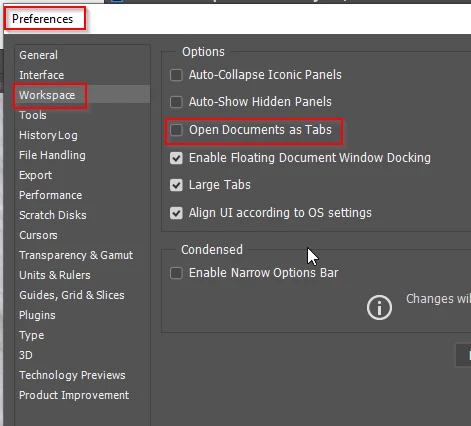
Yes I think that's it. Uncheck Open documents as Tabs and see if it fixes it.

1 reply

Trevor.Dennis
Community Expert
Trevor.DennisCommunity ExpertCorrect answer
Community Expert
April 19, 2022

Ken a screen shot might help, but we can try a frw guesses.


It sounds a bit like Consolidate to Tabs, which I thhink is the default.

Yes I think that's it. Uncheck Open documents as Tabs and see if it fixes it.

Trevor.Dennis
Community Expert
Community Expert
April 19, 2022

Another thing that I think lets documents play more nicely is Overscroll, which I always have turned on.

Ken Nielsen
Legend
April 19, 2022

Nice help and got things running smoothly. What a difference and what an improvement. Thank You Trevor!