
Blacknest
Known Participant
November 23, 2018
Answered

How do I get PS to see all my available font styles?

  • November 23, 2018
  • 2 replies
  • 2584 views

Sorry for the newbie question!

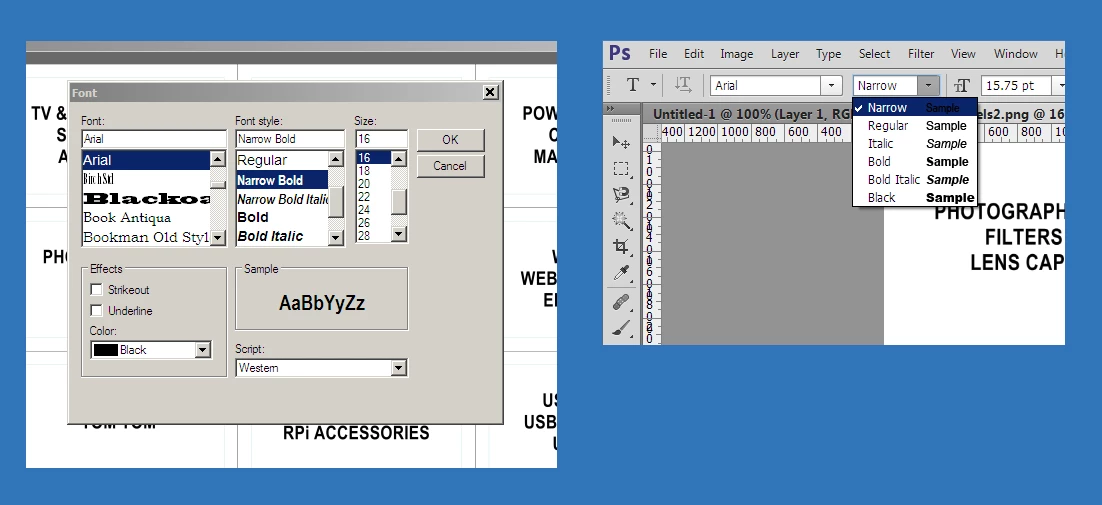
The attached pic shows two screenshot sections. The left-hand one shows a standard font-picking dialog box from a program I wrote (using Visual Studio) to make up sheets of labels. The right-hand one shows the font-picking menu from PS CS6.  As you can see, I can use (for instance) Arial Narrow Bold in my own application, but that particular font style doesn't seem to be available in Photoshop.

I'm guessing this is an issue concerning the file naming of fonts on my system - is there a way I can get PS to see all the available font styles?

(I'm using Ps CS6 running on Windows 7 Pro)
This topic has been closed for replies.
Correct answer TonyMo22

I found the following page:

The Typekit Blog | Arial Narrow gets fixed

This is from ten years ago so you wouldn't think it would be relevant.

However my font list looked like yours, but I tried the suggestion at the end:

The trick is that you need to rebuild the Adobe font cache mechanism. First, exit all Adobe programs. Then, search and delete ALL files of the form AdobeFnt##.lst where ## is a two digit number.”

This has given me the same list of Arial fonts as I can see in Windows, although I don't see Arial Narrow.

2 replies

TonyMo22
TonyMo22Correct answer
Participating Frequently
November 24, 2018

I found the following page:

The Typekit Blog | Arial Narrow gets fixed

This is from ten years ago so you wouldn't think it would be relevant.

However my font list looked like yours, but I tried the suggestion at the end:

The trick is that you need to rebuild the Adobe font cache mechanism. First, exit all Adobe programs. Then, search and delete ALL files of the form AdobeFnt##.lst where ## is a two digit number.”

This has given me the same list of Arial fonts as I can see in Windows, although I don't see Arial Narrow.

Jeff Arola
Community Expert
Community Expert
November 24, 2018

Adobe kb describing the problem:

https://helpx.adobe.com/creative-suite/kb/arial-narrow-unavailable-incomplete-cs.html

Sounds like maybe you have the Arial Narrow version that the article above was referring to and you need the updated fonts.

If you right click on the Arial Narrow Font and go to Properties>Details, what version does it say?

Blacknest
BlacknestAuthor
Known Participant
November 24, 2018

Many thanks for those replies - it all sounds good. I'll check it out tomorrow (past my bedtime now!)

Jeff Arola
Community Expert
Community Expert
November 23, 2018

If you click on the Font Family drop-down list, you don't see other Arial fonts shown like below:

(should be the same on windows as mac)

Blacknest
BlacknestAuthor
Known Participant
November 24, 2018

Hi Jeff -

No, I only get a single entry under 'Arial' in the font family window (see pic).