Known Participant
August 28, 2018
Answered

How do I hide the scroll bars after zoom

  • August 28, 2018
  • 1 reply
  • 4394 views

Hello,

I have noticed that after pressing Z to zoom in or out of an image, the scroll bars appear. How can I hide the scroll bars once I am done? Clicking on Fit or Fill Screen does not do it. The problem I have is that when I am working on a track pad I inadvertently scroll the image when the bars are present.

Thanks,

Michael
This topic has been closed for replies.
Correct answer Sahil.Chawla

Hi Michael,

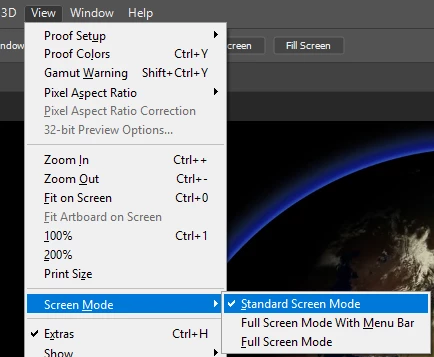
As you want to hide the scroll bar you can toggle the full-screen mode as shown below:

Regards,
Sahil

1 reply

Sahil.Chawla
Adobe Employee
Sahil.ChawlaCorrect answer
Adobe Employee
August 28, 2018

Hi Michael,

As you want to hide the scroll bar you can toggle the full-screen mode as shown below:

Regards,
Sahil

Known Participant
August 29, 2018

Thank you for your reply Sahil. I have confirmed that I am set to Standard Screen Mode. While checking your suggestion I realized that the problem was that I was misinterpreting what Fit Screen meant. I assumed that it was essential a zoom reset. What I needed to do is zoom out more times than I expected to have to. Once I did that the scroll bars where hidden.

Thank you.

Michael