chrissydetroit
Known Participant
October 16, 2017
Question

How do I place a design on a T-Shirt Mockup?

  • October 16, 2017
  • 3 replies
  • 3068 views

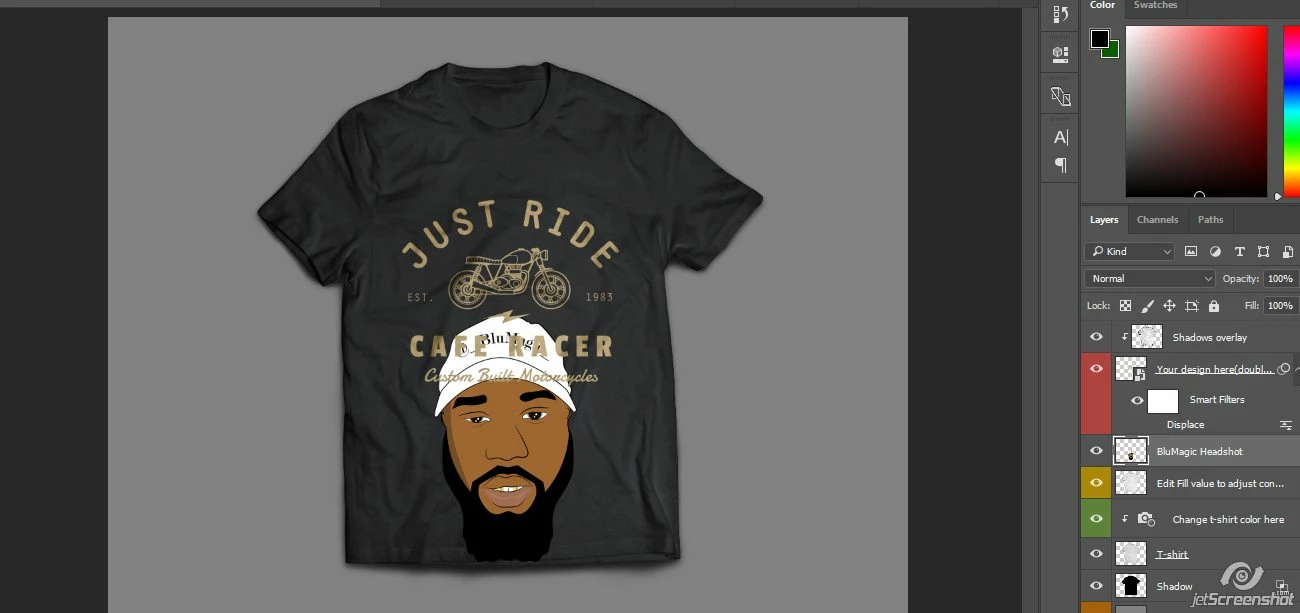
As you can see, the head shot doesn't look like it's in the shirt. The text came with the T-Shirt mock-up. I'm trying to see how to correctly place the head shot logo on the shirt to look realistic. Thanks in advance.
This topic has been closed for replies.

3 replies

WILDCAT54
Inspiring
October 17, 2017

Looks like in this template you would double click the layer thumbnail that says "Your design here"

This will open the layer (smart object) in its own window. Hide existing layer and paste your design on a new layer above that.

Close that window and click "yes" to save. Your design should now appear on your shirt.

JonathanArias
Legend
October 17, 2017