Participant
January 14, 2017
Answered

How do I rollback to the previous update of PS CC?

  • January 14, 2017
  • 3 replies
  • 18659 views

My Wacom tablet is apparently not liking the latest PS update.

I would like to go back to the previous update to see if this solves my issues.

Please, how do I go back to the previous update?

Thanks!
This topic has been closed for replies.
Correct answer davescm

Hi

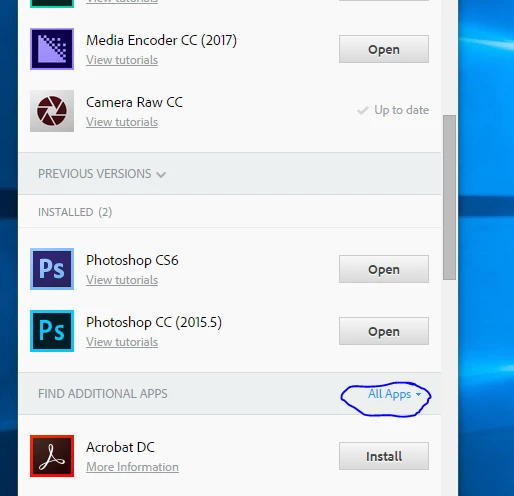
You need to scroll down a little more.

The first block of "Previous Versions" is versions you have installed on your computer

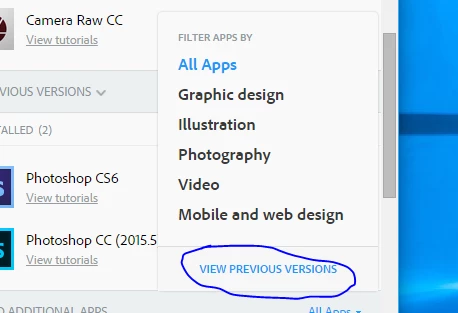
Go down and click the arrow next to All Apps

That will open a list as shown :

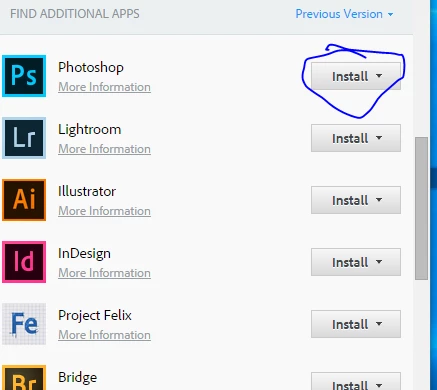
Then you will get a list of apps with previous versions

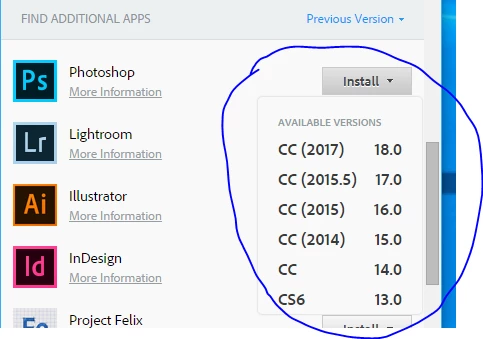
If you click install - you will get a list showing versions available

I hope that helps

Dave

3 replies

Participant
June 24, 2020

Exremely helpful. I was about to lose it with the new update. Thank you!

jane-e
Community Expert
Community Expert
January 14, 2017

Moved from the Lounge to Photoshop General Discussion by Moderator

jane-e
Community Expert
Community Expert
January 14, 2017
19Maria57Author
Participant
January 14, 2017

Thank you, but as I follow the above instructions, PS is not shown under "Previous Versions".  And when I click on the Photoshop CC 2017 under  "Installed", the only option that I have is to uninstall. 

davescm
Community Expert
davescmCommunity ExpertCorrect answer
Community Expert
January 18, 2017

Hi

You need to scroll down a little more.

The first block of "Previous Versions" is versions you have installed on your computer

Go down and click the arrow next to All Apps

That will open a list as shown :

Then you will get a list of apps with previous versions

If you click install - you will get a list showing versions available

I hope that helps

Dave