
Known Participant
June 25, 2019
Answered

How do I save my image in DNG ?

  • June 25, 2019
  • 1 reply
  • 1703 views

Im a LR veteran (used a lot, not necessary an expert) and I have had to do a photo merge of 2 dngs in PS CC2019, which I never use. After videos and a lot of time, I think I have done it ok, but cannot save it (greyed out). I can Save as but only as Png, jpg, gif or svg(whatever that is). I looked at the instructions, but it just says Save first - which I can't.

How can I do this? Any recommendations gratefully received...

Thanks,

Nick
    This topic has been closed for replies.
    Correct answer D Fosse

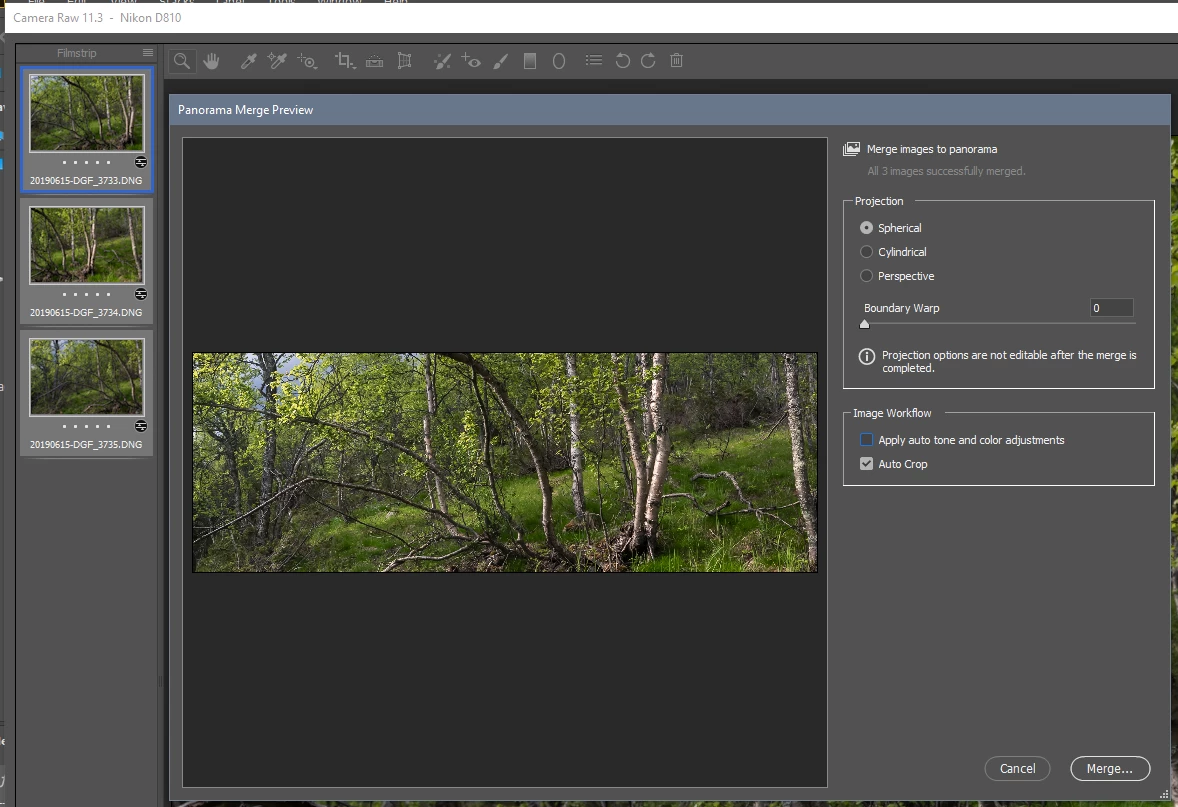
    You can merge DNGs in either ACR or Lightroom, and the result is a new native DNG file that can be processed in any raw converter.

    However, this is very different from merging files that have been opened into Photoshop. What you have open in Photoshop is not a raw file, but a rendered RGB file. Once a raw file has been processed into an RGB file, you can't go back.

    There are ways to save this out as DNG, but there's really no point. It's just an RGB file in a DNG wrapper.

    Here's the DNG merge function in ACR:

    1 reply

    gener7
    Community Expert
    Community Expert
    June 25, 2019
    Known Participant
    June 25, 2019

    Thank you!

    Nick

    Nicholas Harvey Photography Ltd.

    [Address, phone, email, etc., removed by moderator. This is a public forum.]

    D Fosse
    Community Expert
    D FosseCommunity ExpertCorrect answer
    Community Expert
    June 25, 2019

    You can merge DNGs in either ACR or Lightroom, and the result is a new native DNG file that can be processed in any raw converter.

    However, this is very different from merging files that have been opened into Photoshop. What you have open in Photoshop is not a raw file, but a rendered RGB file. Once a raw file has been processed into an RGB file, you can't go back.

    There are ways to save this out as DNG, but there's really no point. It's just an RGB file in a DNG wrapper.

    Here's the DNG merge function in ACR: