Participant
June 7, 2017
Answered

How do I set image resolution between 4MP & 100MP for Adobe Stock Submission

  • June 7, 2017
  • 3 replies
  • 24554 views

This should be simple - I know the Image Size selection shows Resolution - is that where I set it?  Most everything I read says that should be 300 - do I just change it to 100?
This topic has been closed for replies.
Correct answer davescm

In this case it means total pixels. It has nothing to do with the ppi print resolution.

Multiply the Width in Pixels x Height in Pixels

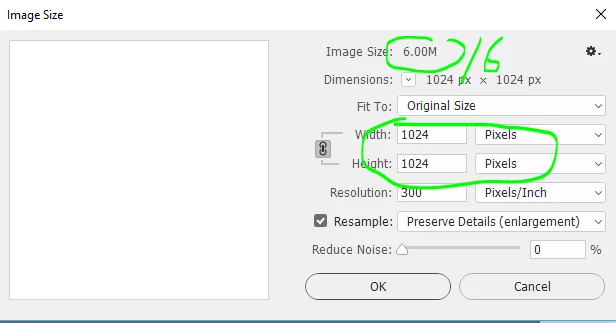
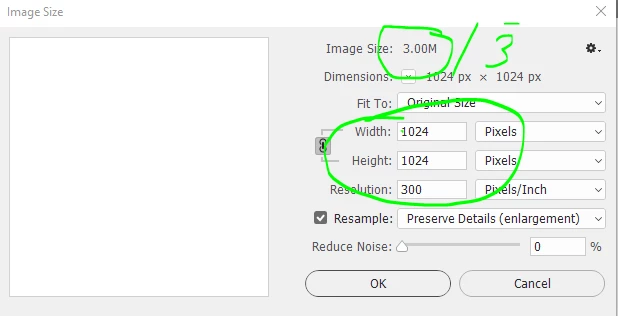
Note if you use the Image Size dialogue you can divide the top number (Image Size) by 3 for an 8 bit mode image and by 6 for a 16 bit mode image and get the same result

8 bit 1024 x 1024 = 1048576 = 1 MP

16 bit 1024 x 1024 -1048576 = 1MP

Dave

3 replies

Participant
August 17, 2024

what is the 1.5 MB size?

Bojan Živković11378569
Community Expert
Community Expert
April 28, 2023

Beside MP requirements there is and size in MB requirements I think. Do not upscale images as already suggested and save them using Save a Copy, for example, when saving from Photoshop. Set highest quality possible (12), Baseline Standard will do the job. I am Adobe Stock contributor with around 8.000 submissions so far.

davescm
Community Expert
davescmCommunity ExpertCorrect answer
Community Expert
June 7, 2017

In this case it means total pixels. It has nothing to do with the ppi print resolution.

Multiply the Width in Pixels x Height in Pixels

Note if you use the Image Size dialogue you can divide the top number (Image Size) by 3 for an 8 bit mode image and by 6 for a 16 bit mode image and get the same result

8 bit 1024 x 1024 = 1048576 = 1 MP

16 bit 1024 x 1024 -1048576 = 1MP

Dave

Participant
June 7, 2017

Dave

Thanks for the response.  I have been doing some reading now that you gave me a start - I looked at a couple of my .jpg images.  One is 7360 X 4912 = 36MP, so it fits the 4MP to 100MP requirement.  Another is 5599 X 4096 = 22MP

From the images I checked, it looks like my .jpg images I create from the original NEF I take in camera will fall within the 4MP to 100MP range, and I can control file size by the image quality slider when I save the .jpg    Am I understanding correctly? 

I wonder how I would change the pixels to increase the MP of the image?  Like the image above that is 5599 X 4096 - if I for some reason want to change it to 7360 X 4912 - can I leave resampling on and do that?  What are the inherent dangers if I do that? 

I used to have several outlets to sell my photos back in the days of film - it has easily been 15 or so years ago.  I have never delved into how to sell my digital images.  If I put images on Adobe Stock - do they watermark it or in some way render it unusable until someone pays for it?  Any words of wisdom you can share? 

Again - Thank You.  I really appreciate your input. 

- Chuck

davescm
Community Expert
Community Expert
June 7, 2017

Hi Chuck

I don't sell stock but can answer some of your questions.

Familiarize yourself with these submission guidelines before you begin to submit content to Adobe Stock...

1. Don't resize the images, if they fall within the size guidelines ( yours do) . By resampling you will introduce artifacts that will be emphasised further by the final user when they size them for their use.

2. Whilst you could use the jpeg out of the camera - you may (probably will   ) get better results from processing RAW files in ACR/Lightroom. Apply a little sharpening in the RAw conversion but not heavy (and none to camera jpegs). Over sharpened images look awful and do not take well to further resizing by the user. Make sure they are well exposed and sharply focussed (unless blur is intentional).

3. Use Save for Web (Legacy) to export your image as a jpeg . Ensure that "Convert to sRGB"  and "Embed color profile" are both checked.  Set the jpeg quality to the highest you can get away with whilst keeping the filesize below the 45Mbytes limit (note that limit is the exported file size not the image pixel size as in your first question.

4. You can check the Adobe stock site - Watermarked (with the words Adobe Stock) images are available for preview download until paid for.

I hope that helps you

Dave