Participant
April 6, 2018
Answered

How do I skew a shape gradient?

  • April 6, 2018
  • 3 replies
  • 776 views

I assume this should be trivially easy, but for the life of me I can't figure out how to do it, and 20 minutes of googling hasn't given me any clues.

I started with a rectangle shape and then applied a gradient to it. Then I skewed the rectangle so that the top edge was shorter than the bottom edge, expecting that the gradient would also be skewed, but it is not:
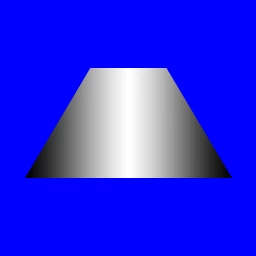
So how can I get the gradient to skew along with the shape? (*Without* rasterizing the shape, which makes it too hard to work with.)

Thanks for your help!

    This topic has been closed for replies.
    Correct answer Theresa J

    You could create a rectangular gradient shape layer, convert it to a smart object and then transform the smart object.

    3 replies

    Theresa J
    Community Expert
    Theresa JCommunity ExpertCorrect answer
    Community Expert
    April 6, 2018

    You could create a rectangular gradient shape layer, convert it to a smart object and then transform the smart object.

    davescm
    Community Expert
    Community Expert
    April 6, 2018

    Hi

    The  two ways I could think of would be to either:

    1. Clip a layer with a gradient to the vector shape - although it will need to be transformed separately

    or

    2.Create a vector mask on a gradient pixel layer. When you transform the layer the vector mask will also transform keeping it sharp

    Dave

    War Unicorn
    Community Expert
    Community Expert
    April 6, 2018

    The only thing I can think of is to use the shape as a mask on another layer to control a (raster) gradient? That seems...involved, though.