

Serene_observer5E99
Inspiring
March 14, 2026
Question

How do I stop Adobe software from using so much memory?

  • March 14, 2026
  • 3 replies
  • 119 views

I have reached a breaking point with Adobe software. It is now using so much memory any time that any time I launch an application I can barely get any work done at all. The apps are slow, they lag, they stop responding. I can’t have more than one Adobe app open at a time.

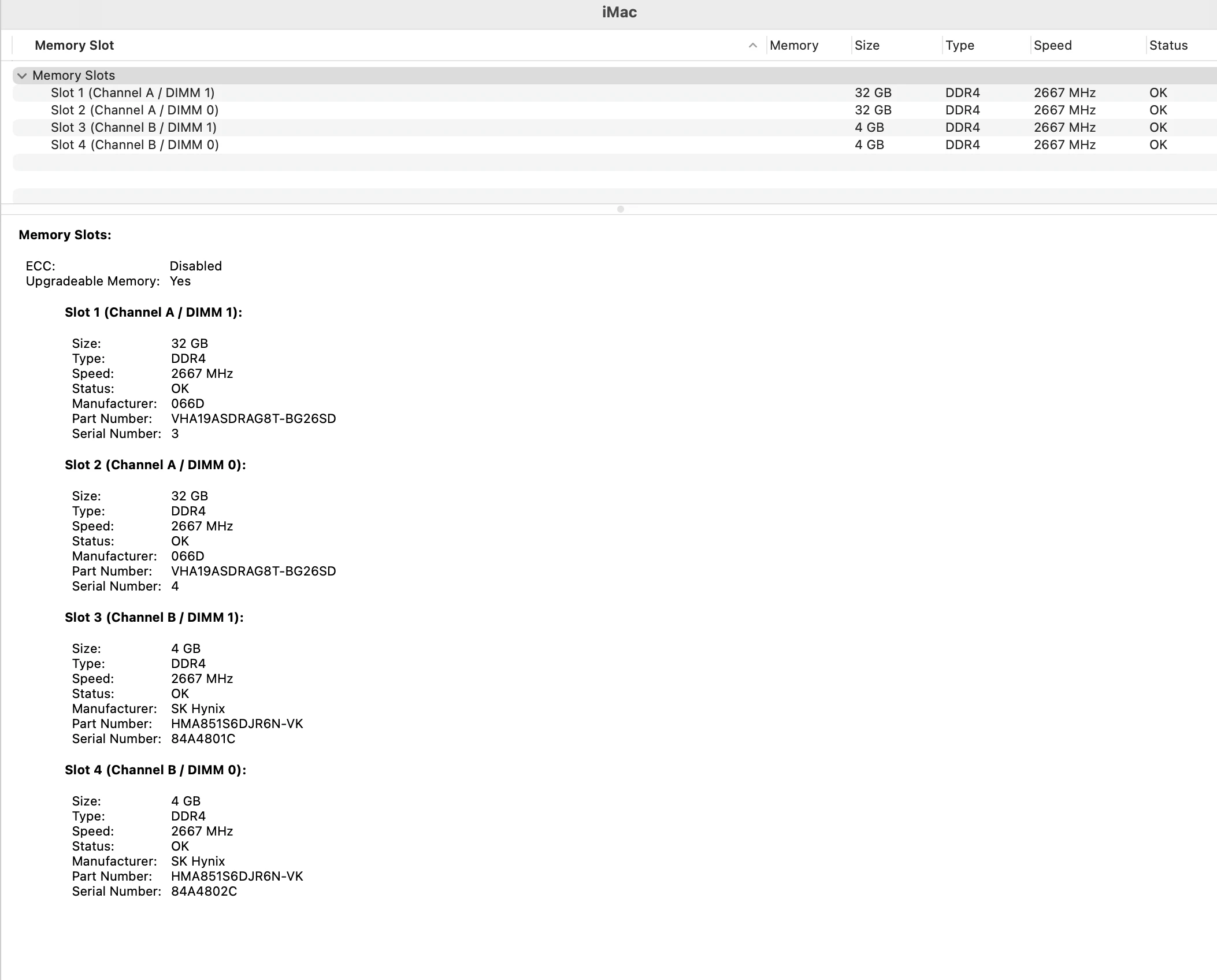
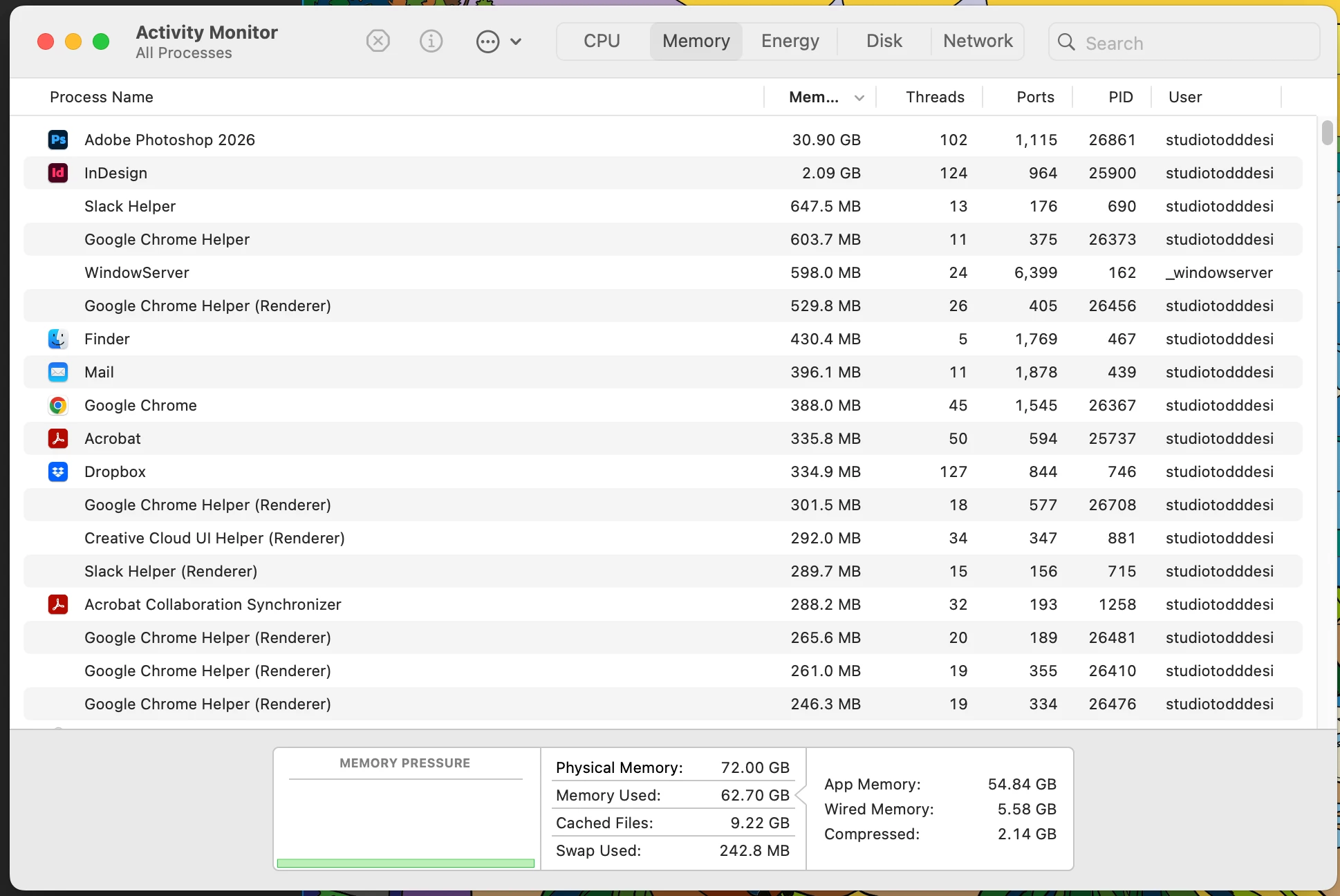
Even now, with InDesign sitting idle it is using 2.09 GB. And Photoshop with a file open that is 181 mb is using over 30 GB
!!

This started when I upgraded to Tahoe. The memory problems and slow downs were unbelieveble so I switched back to Sequoia. That seemed to ersolve the problem for a short while but it is now worse than it has ever been.

Please let me know what kind f info you need from me to help with this issue. I’m posting some screen shots that might or might not be helpful--I’m just guessing because I don’t know.

Please help!


    3 replies

    Legend
    March 16, 2026

    Just as a note, I’m running Photoshop on Tahoe and what are now two lower-end machines- an Intel MacBook Pro w/16GB of RAM, and an M1 Mac mini w/16GB of RAM. I also always have Bridge open on the Intel and Lightroom Classic (with a 300k-image catalog) open on the Mini. The Intel consistently stays in the green for memory pressure, although the Wacom driver has a memory leak and has to be restarted ever couple of days. The Mini is on the edge of green/yellow for memory pressure since Lightroom is a pig. I very much want to upgrade both soon but both are certainly usable as-is.

    Don’t worry about memory usage as long as the meter stays in the green. You WANT the computer to use available memory.

    Inspiring
    March 14, 2026

    I had been dealing with the problem of Photoshop using up to 100% of my system ram when opening.  At times, it would not completely open.  I tried reducing the amount of ram allowed to Photoshop and that allowed me to at least get the program open but it still used 80%+ ram.  Photoshop also took longer and longer to open when it did open. It was taking 1 minute and 20 seconds to open.  Today I solved both problems in a surprisingly easy way.  I moved the Photoshop settings from Appdata to my desktop and let Photoshop recreate those preferences.  That’s all.  Photoshop immediately opened within 5 seconds.  Then I carefully moved some of my customizations back into Appdata one at a time to see if anything in particular was causing it to take so long to open but everything was fine.  Also, Photoshop’s performance when opening complex files is drastically improved.  Complex files open almost instantly.  I can’t even remember a time when Photoshop performed as well as it is right now and I’ve used Photoshop since the 90’s.  My guess though is that over time, Photoshop accumulates a lot of stuff in Appdata and probably it needs to be dumped and rebuilt from time to time.  I’ve never done that as a policy. One last thing.  My memory usage after opening Photoshop is down from 89% down to 33%.

    D Fosse
    Community Expert
    Community Expert
    March 14, 2026

    This sounds much more like a GPU driver issue. Memory usage looks normal. Try to do a complete reset of preferences/settings. This goes beyond your own user settings, it's the entire application configuration including hidden and system-dependent parameters. Corrupt settings usually look like application bugs.


    Photoshop doesn't slow down in low memory. It just writes to disk, physical memory is just used as a cache. The heavy lifting is the scratch disk. As long as you have enough free disk space, Photoshp will keep on working normally.


    You should always have a couple of hundred GB free disk space. But if you're running low, reducing the number of history states will dramatically reduce the scratch size.

    Ged_Traynor
    Community Expert
    Community Expert
    March 14, 2026

    Memory usage looks normal” with a 181 MB file opened in Photoshop I wouldn't consider 30.9 GB of memory used normal


    D Fosse
    Community Expert
    Community Expert
    March 14, 2026

    That depends on history states and GPU usage. 


    The dark horse in this is that memory used by the GPU performing Photoshop tasks, is listed under Photoshop. That can be a lot. Remember that this is an integrated GPU that uses shared system memory.


    We have seen cases where GPU memory runs wild, but most of those cases, if not all, are fixed by resetting preferences. But in those cases it’s exceeding the allocation set in preferences, going up to 100% and even above, eating into the system pagefile. That’s when the whole system chokes. Here there is 72 GB total, so 30 GB is well within a standard memory allocation of around 70 %.