
Inspiring
November 12, 2018
Answered

How do I stop the creation of new layer style in Creative Cloud?

  • November 12, 2018
  • 2 replies
  • 808 views

I'm new to Creative Cloud, but not to Photoshop. Every time I style a layer, that style gets saved in the layer style section. I am NOT hitting the "new style" button. This is driving me crazy and really slowing down my work. There must be a setting to stop this, but I can't find it. How do I make this stop, and delete the styles I don't need to save?
This topic has been closed for replies.
Correct answer sharp_hands16B8

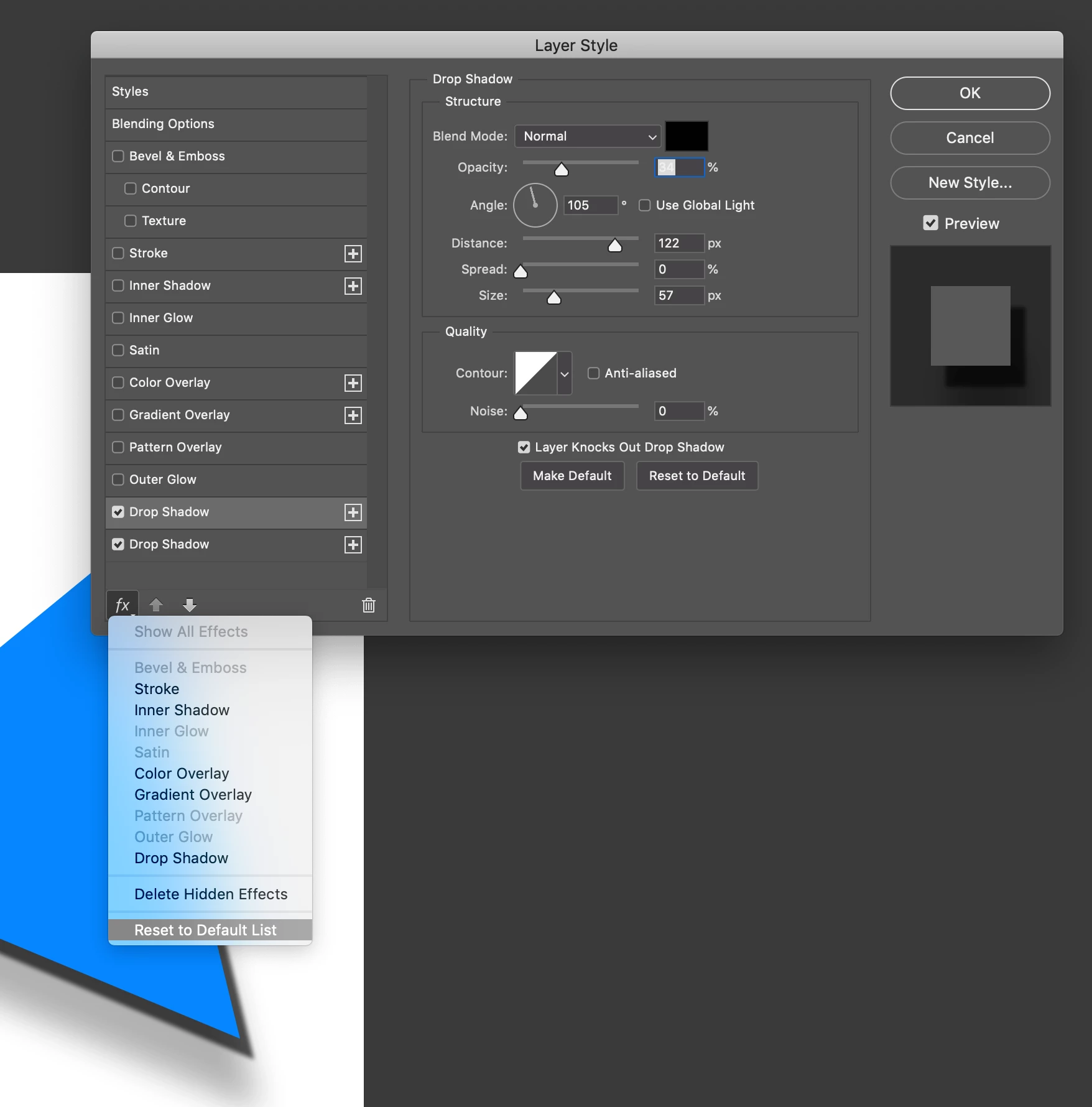
To reset it the fast way, use the FX pull down/contextual menu in the bottom left. There you'll see an option to reset to Default List. This will eliminate duplicates.


Basically if you have used stacked Layer Styles in the past (by pushing the plus symbol) it leaves that arrangement of options as the default in your Layer Style dialogue for the application, not just that file.

Good luck!
lifebypixels

2 replies

sharp_hands16B8
Community Expert
sharp_hands16B8Community ExpertCorrect answer
Community Expert
March 6, 2019

To reset it the fast way, use the FX pull down/contextual menu in the bottom left. There you'll see an option to reset to Default List. This will eliminate duplicates.


Basically if you have used stacked Layer Styles in the past (by pushing the plus symbol) it leaves that arrangement of options as the default in your Layer Style dialogue for the application, not just that file.

Good luck!
lifebypixels

Inspiring
March 6, 2019

Thank you! I was hitting the plus sign because I thought that was the correct thing to do. No more plus signs for me!

Sahil.Chawla
Adobe Employee
Adobe Employee
November 12, 2018

Hi there,

As the layer styles are saving to the Creative Cloud library, could you please make sure the "Add to my current library" option is no checked when you create a new layer style?

Regards,
Sahil

Inspiring
March 6, 2019

I don't know why I didn't see this months ago, or why Adobe just emailed me about it now, but I don't see anything like the image you posted above. Here is a screenshot of my layer effects. Do you see how there are so many options for Stroke and Color Overlay? They are being saved and I don't know why.

My Creative Cloud is updated and I have the latest version of Photoshop CC.