
JodiM1978
Participant
March 21, 2022
Question

How do I take an offset photograph and manipulate it so that it looks straight on?

  • March 21, 2022
  • 2 replies
  • 408 views

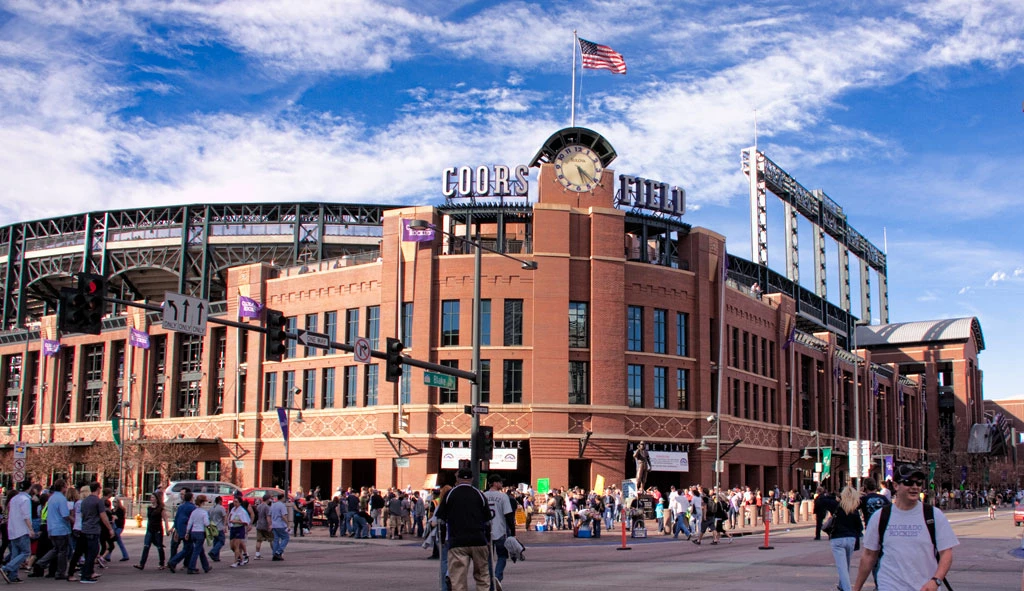
This photo is an example of what I am talking about. Is there a way to make this photo look like the photographer took this photo straight on rather than off center? I understand that it might look slightly wierd similar to the Perspective Crop tool. Thank you for your help. 
 

This topic has been closed for replies.

2 replies

Myra Ferguson
Community Expert
Community Expert
March 21, 2022

Instead of the Perspective Crop tool, try Perspective Warp ( Edit > Perspective Warp). Set one plane to be the left side of the image. Even though the entrance to Coors Field is rounded, make the end of that left side go to the middle of the entrance. Then draw the next plane from the center of the entrance to the right edge. After laying out the planes, select Warp, and move the center pins over toward the left. When the image looks adjusted how you'd like, then hit Enter (Windows)/Return (macOS) or click the checkbox in the Options bar.


Here's more info on Perspective Warp:

Perspective warp

Conrad_C
Community Expert
Community Expert
March 21, 2022

Sounds like you want to try the Perspective Warp feature. The example in the linked help page is similar to yours. For a more straight-on view, follow the steps in the linked help page, but in your example pull the top and bottom center pins to the left, so that the right side of the building is more prominent and more equal to the left side.


You’re correct in that it might look slightly weird. One reason would be that on the right side, less of the window surfaces are visible because of the angle. Stretching that out won't reveal window glass that wasn’t in the original picture.