Inspiring
May 17, 2011
Answered

How do we create a plugin setup file for Mac/Win?

  • May 17, 2011
  • 2 replies
  • 1456 views

Hello!

I am a relatively new plugin coder! I have successfully developed a few small plugins. Now, the general course of going about a setup of a plugin is to copy & paste it in the Plugins folder of Adobe Photoshop. Is there an alternate method? Like, a setup, that installs the plugin at the appropriate location! I searched the internet but couldn't find anything of much use.

Help needed...!!! 

Thanks! 

This topic has been closed for replies.
Correct answer Noel Carboni

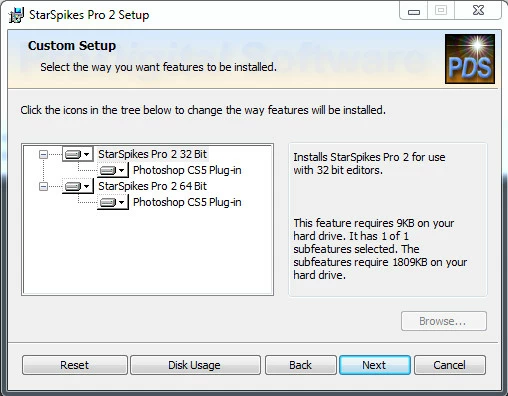
We created a full installer for our Windows plug-ins, using the new Windows Installer XML (WiX) Toolset.  We look for the registry items and folders identifying the various versions of Photoshop (and other editors) and put up a "tree view' that allows the user to select which version(s) of Photoshop he/she wants to install into.

Don't forget also, that if you create 32 and 64 bit versions (for running with both 32 and 64 bit Photoshop), you'll have to deal with getting the proper files into the proper folders. WiX allowed us to package both 32 and 64 bit versions all in one executable.

It's almost a necessity to create a real installer in this day and age of User Account Control (UAC).  The installer will need to run with elevated privileges to be able to write into the Plug-ins subfolders, for example.

-Noel

2 replies

Noel Carboni
Noel CarboniCorrect answer
Legend
May 23, 2011

We created a full installer for our Windows plug-ins, using the new Windows Installer XML (WiX) Toolset.  We look for the registry items and folders identifying the various versions of Photoshop (and other editors) and put up a "tree view' that allows the user to select which version(s) of Photoshop he/she wants to install into.

Don't forget also, that if you create 32 and 64 bit versions (for running with both 32 and 64 bit Photoshop), you'll have to deal with getting the proper files into the proper folders. WiX allowed us to package both 32 and 64 bit versions all in one executable.

It's almost a necessity to create a real installer in this day and age of User Account Control (UAC).  The installer will need to run with elevated privileges to be able to write into the Plug-ins subfolders, for example.

-Noel

Adobe Employee
May 17, 2011

On Windows, you can have your setup program check the registry for plugins folder path:

HKEY_LOCAL_MACHINE/SOFTWARE/Adobe/Photoshop/

It would follow by the version number, within that version would be a string value key called "PluginPath", this would hold the full path to plugins folder, this is where you want the installer/setup to copy your plugins to.

eg.  HKEY_LOCAL_MACHINE/SOFTWARE/Adobe/Photoshop/12.0/  the key PluginPath = "C:\Program Files\Adobe\Adobe Photoshop CS5 (64 Bit)\Plug-ins\"

Keep in mind that on 64 bit OS, the registry key will tell you about 64 bit location, not the 32 bit location.  If your plugin comes with both 32 bit and 64 bit, you need to do some checking to make sure that it knows which path is which.   eg.  if you see 64 bits in the path, the other one should be C:\Program Files (x86)\Adobe\Adobe Photoshop CS5\Plug-ins\ -- provided that the user choose to install 32 bit.  Also keep in mind that users can have multiple versions of Photoshop.

There really isn't an easy way on the Mac other than having the installer test to see if /Applications/Adobe Photoshop CS5/Plug-ins/ (and test for other versions)

OR... you can always ask the user where the plug-ins folder is.

Chris Cox
Legend
May 18, 2011

Macintosh has a plugin paths file in the user preferences folder, named for each version.

Adobe Employee
May 18, 2011

OH YEAH!!  Thanks Chris, totally forgot about that one.