Inspiring
August 11, 2019
Answered

How do you bring your own color to the color swatch?
  • August 11, 2019
  • 2 replies
  • 743 views

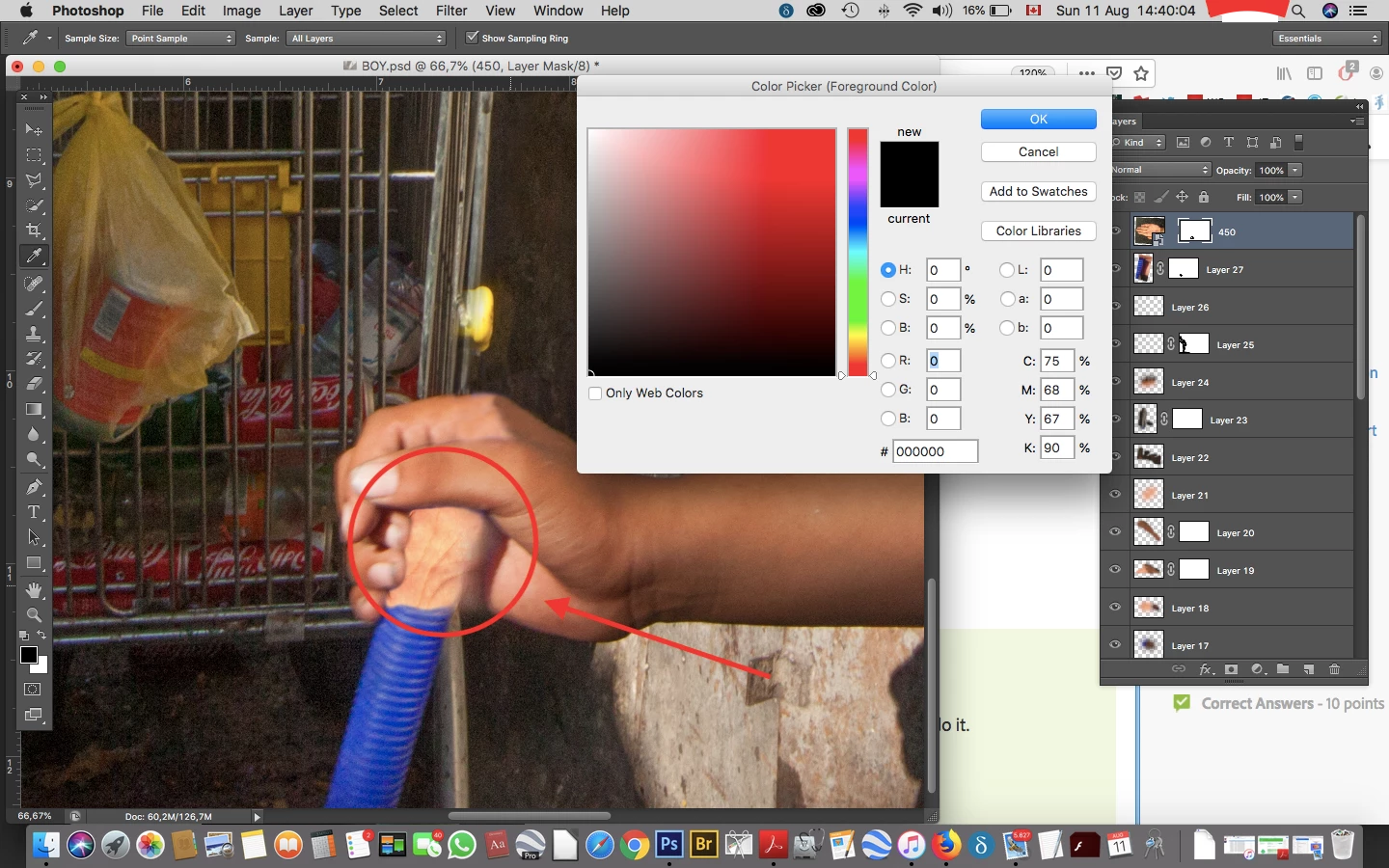
Hi, I need to bring the color of the real hand into the color swatch so I can go over the imported part of the hand where I hide the hose.

I click on the real hand with the color picker - the eye dropper - but the color doesnt show up in the color swatch, thank you

    This topic has been closed for replies.
    Correct answer Semaphoric

    It looks like you have the layer mask selected, rather than the content.

    2 replies

    Semaphoric
    Community Expert
    SemaphoricCommunity ExpertCorrect answer
    Community Expert
    August 11, 2019

    It looks like you have the layer mask selected, rather than the content.

    August 11, 2019

    Ah well spotted

    Inspiring
    August 11, 2019

    thank you all closed

    August 11, 2019

    Hi

    Did you hit the Add to Swatches button

    Inspiring
    August 11, 2019

    I click on hand, add to swatches, give name to swatch, ok like in scrrenshot, now I need to find it.

    I can't write in the "#" field Thank you

    I can't write in the # field.

    Inspiring
    August 11, 2019

    THIS is PS CS6