Swandive stream
Inspiring
September 1, 2025
Answered

How do you keep styles, brushes, etc. when updating versions of Photoshop?

  • September 1, 2025
  • 1 reply
  • 204 views

The trouble is, say I move from Photoshop CC 2024 to CC 2025, since these are treated as separate application files rather than updates to the same one, the associated styles, brushes etc. are not transferred across. 

Correct answer Trevor.Dennis

Blimey.  I  must have typed this out a good few times now, but this is how I do it.


I have an Adobe folder in My Documents.

In that folder I place my Photoshop assets and presets, and I place a shortcut to those folders in the relevant Photoshop folder.  This means I can share the same presets with the current release version, plus beta and 22.2 which I have installed just for Lighting Effects.  It also keeps everything safe after a major update

I also place any new fonts I download into a My Docs folder so I have them for when I get a new computer.


The downside is that when you export something like a Brush .abr file it saves to the default location, and you have to remember to move it to the My Docs folder.  It then immediately becomes available in the other installed Photoshop versions.


I save things like shortcuts and toolbars to custom workspaces, and share those workspaces between versions.  We have 

had a few new tools in recent years (Remove Tool, Star Tool, Adjustment Brush) which means updating the Toolbar and resaving your custom workspaces.


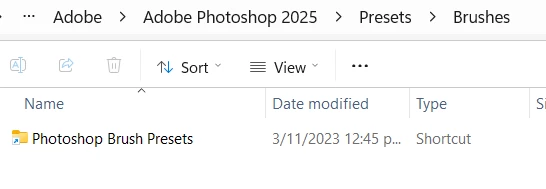
I expect you know this, but with Windows to make a shortcut you locate and right click the folder, choose Show More Options and then Create Shortcut. That creates an icon like below, that you can drag/copy to the folder you need to point back to your My Docs folder.

 

1 reply

Trevor.Dennis
Community Expert
Trevor.DennisCommunity ExpertCorrect answer
Community Expert
September 2, 2025

Blimey.  I  must have typed this out a good few times now, but this is how I do it.


I have an Adobe folder in My Documents.

In that folder I place my Photoshop assets and presets, and I place a shortcut to those folders in the relevant Photoshop folder.  This means I can share the same presets with the current release version, plus beta and 22.2 which I have installed just for Lighting Effects.  It also keeps everything safe after a major update

I also place any new fonts I download into a My Docs folder so I have them for when I get a new computer.


The downside is that when you export something like a Brush .abr file it saves to the default location, and you have to remember to move it to the My Docs folder.  It then immediately becomes available in the other installed Photoshop versions.


I save things like shortcuts and toolbars to custom workspaces, and share those workspaces between versions.  We have 

had a few new tools in recent years (Remove Tool, Star Tool, Adjustment Brush) which means updating the Toolbar and resaving your custom workspaces.


I expect you know this, but with Windows to make a shortcut you locate and right click the folder, choose Show More Options and then Create Shortcut. That creates an icon like below, that you can drag/copy to the folder you need to point back to your My Docs folder.
