
Inspiring
April 9, 2023
Answered

How do you link an adjastment layer to the underneath layer only
  • April 9, 2023
  • 3 replies
  • 1139 views

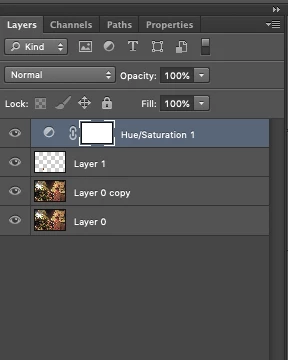
Hi, many years ago I used to link an adjustment layer to the underneath layer. That was done with option click or command click I don't remember. Certainly not control click. This is important when your underlying layer is a patch, a small portion because you don't want the effect on the whole image.

In this case my patch is in layer 1. For "patch" I mean a portion of layer 0 brought up to layer 1 with Command C, Command V. The resulting link was a rght angle arrow pointing from the A Layer to the underlying layer. Doing the above I don't obtain anything. Thanks


This topic has been closed for replies.
Correct answer Ged_Traynor

@margieannejulie you have 2 options to create a clipping mask, either ALT click between the 2 layers or right click on the adjustment layer and select create clipping mask


3 replies

jane-e
Community Expert
Community Expert
April 9, 2023

@margieannejulie 


For clarity (and for others who see this in the future), because you are on a Mac it's Option+Click between the layers 😊.


Jane


Ged_Traynor
Community Expert
Community Expert
April 9, 2023

@jane-e I missed the MAC bit 😉

Ged_Traynor
Community Expert
Ged_TraynorCommunity ExpertCorrect answer
Community Expert
April 9, 2023

@margieannejulie you have 2 options to create a clipping mask, either ALT click between the 2 layers or right click on the adjustment layer and select create clipping mask


Inspiring
April 9, 2023

so it was between the 2, that's why, harder to know who was first, thank you

Inspiring
April 9, 2023

D Fosse
Community Expert
Community Expert
April 9, 2023

Alt-click between the layers to clip to underlying layer. You'll see a small arrow symbol in the clipped layer.

Ged_Traynor
Community Expert
Community Expert
April 9, 2023

@D Fosse you beat me by 17 seconds 😁