SGart
Participant
March 12, 2018
Répondu

How I can change gray scale to color view again? Help, please

I changed a normal Photoshop settings to Grayscale. Later, I wanted to go back to normal color choose/pallete again. BUt I can not . Even when I start a new file,  it does not give me option to paint in color. I am a beginner and do not know what to do. There is no checkmark in front of Grayscale  (Image--Adgutments--black and white), but even when I open a picture/photo that is colorful from the beginning ( in my computer files), it opens in gray scale.  Please, help.
    Ce sujet a été fermé aux réponses.
    Meilleure réponse par D Fosse

    2 commentaires

    Derek Cross
    Community Expert
    Community Expert
    March 12, 2018

    Just to add to D Fosse’s excellent description, once you’ve converted an RGB image to Greyscale and saved it, the image cannot be restored to the original colour.

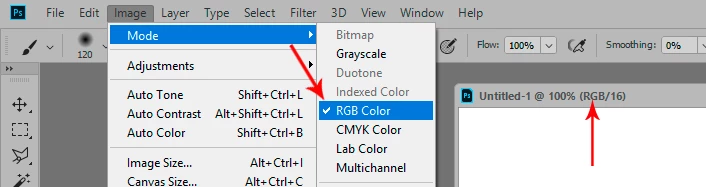
    If you want to add color to an image that’s in Greyscale mode, for you can convert it to RGB color mode (but it won't be the original color).

    The tab at the top of Photoshop indicates very useful information: the file name, the format, the magnification, the color mode and the color depth, see screen shot.

    D Fosse
    Community Expert
    D FosseCommunity ExpertRéponse
    Community Expert
    March 12, 2018