
Colin ST
Participant
June 16, 2022
Question

How is this effect achieved?

  • June 16, 2022
  • 6 replies
  • 443 views

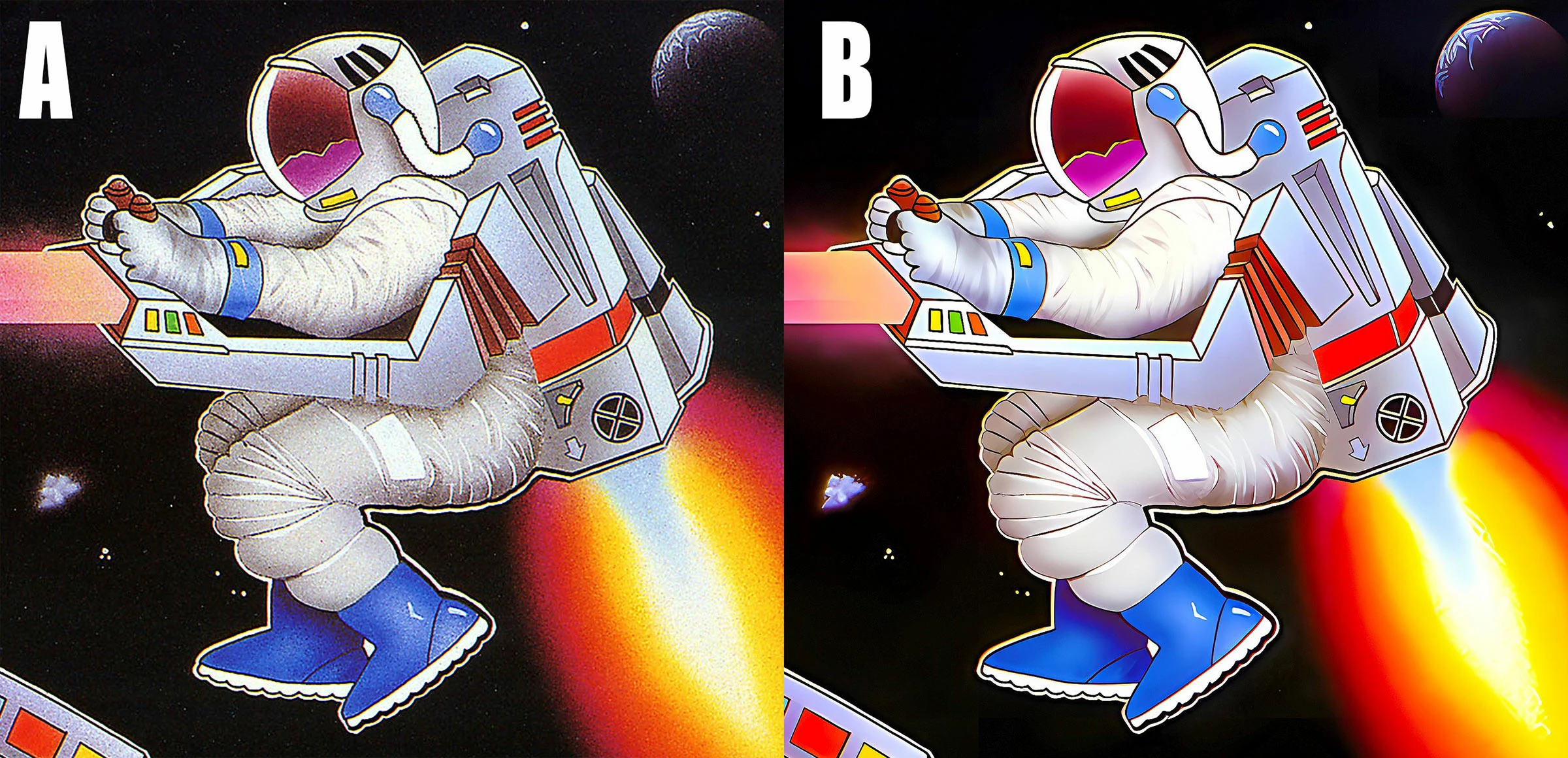
Can someone please explain to me how the effect of changing image A to image B is achieved, please? Is it a relatively simple process, or perhaps there's a plugin/action that might achieve similar results?

Colin.
6 replies

Stephen Marsh
Community Expert
Community Expert
June 17, 2022
Participant
June 17, 2022

I think Image B was made using the image-upscaling AI Waifu2x.

If you google Waifu2x you can find multiple sites that host the AI.

You put it an image (such as the one on the left) and it upscales the resolution with optional settings for removing noise, but leaving some artifacting which looks consistent with Image B.

try it out!

Earth Oliver
Legend
June 17, 2022

Looks to me like the noise was added to B and not the other way around.

Zesty_wanderlust15A7
Known Participant
June 17, 2022

I gave it a try and Surface Blur is indeed the main component. I had to add noise reduction too.

From the first step I already lost too much line detail, even with an edge mask (which I'm not an expert at).

I also added a curve for contrast, played with Shadow/Highlight, ...

Color is different and lost detail, so a way is needed to preserve the black lines or enhance them before or after.

My attempt on the left...

Colin ST
Colin STAuthor
Participant
June 17, 2022

Thanks for your efforts. Do you think that maybe these are just redrawn from scratch in Illustrator then?

Zesty_wanderlust15A7
Known Participant
June 17, 2022

My gut reaction would be, "no way."

There might be more work that has gone into it than I think, or they did slight touch-ups, or they had an original that was a little better than you showed, or they are more knowledgeable about conserving detail, or I'm overlooking something simple, or... this style also reminds me of an older plugin Topaz had.

They had one or two that did these effects. Topaz Clean was the main one, IIRC. "Topaz Clean is a powerful detail smoothing and edge stylization plug-in that simplifies advanced techniques typically used for creating smooth, flawless skin and curly, vectorized effects"

These still work in the current PS if you can somehow get them. Maybe Topaz has similar stuff in their current Adjust AI.

Leslie Moak Murray
Community Expert
Community Expert
June 17, 2022

The speckles are digital noise, and I don't know of a way to change A to B without some loss of detail. There are various software programs that reduce noise, but it's always at the price of blurring and a loss of detail.

Chuck Uebele
Community Expert
Community Expert
June 16, 2022

If you're talking about eliminating the noise in image A, then maybe use surface blur, or dust and scratches.