
PerrowPhoto
Participating Frequently
November 27, 2020
Answered

How to add a simple filter to a layer with a script

  • November 27, 2020
  • 2 replies
  • 1192 views

Hello all


Just getting started with scripts and JS, so I apologize if this is a dumb question.

How would I add a Gaussian Blur (amount 26) filter to my active layer using a script?

I have been experimenting but have not gotten it to work, thank you all in advance.
This topic has been closed for replies.
Correct answer Stephen Marsh

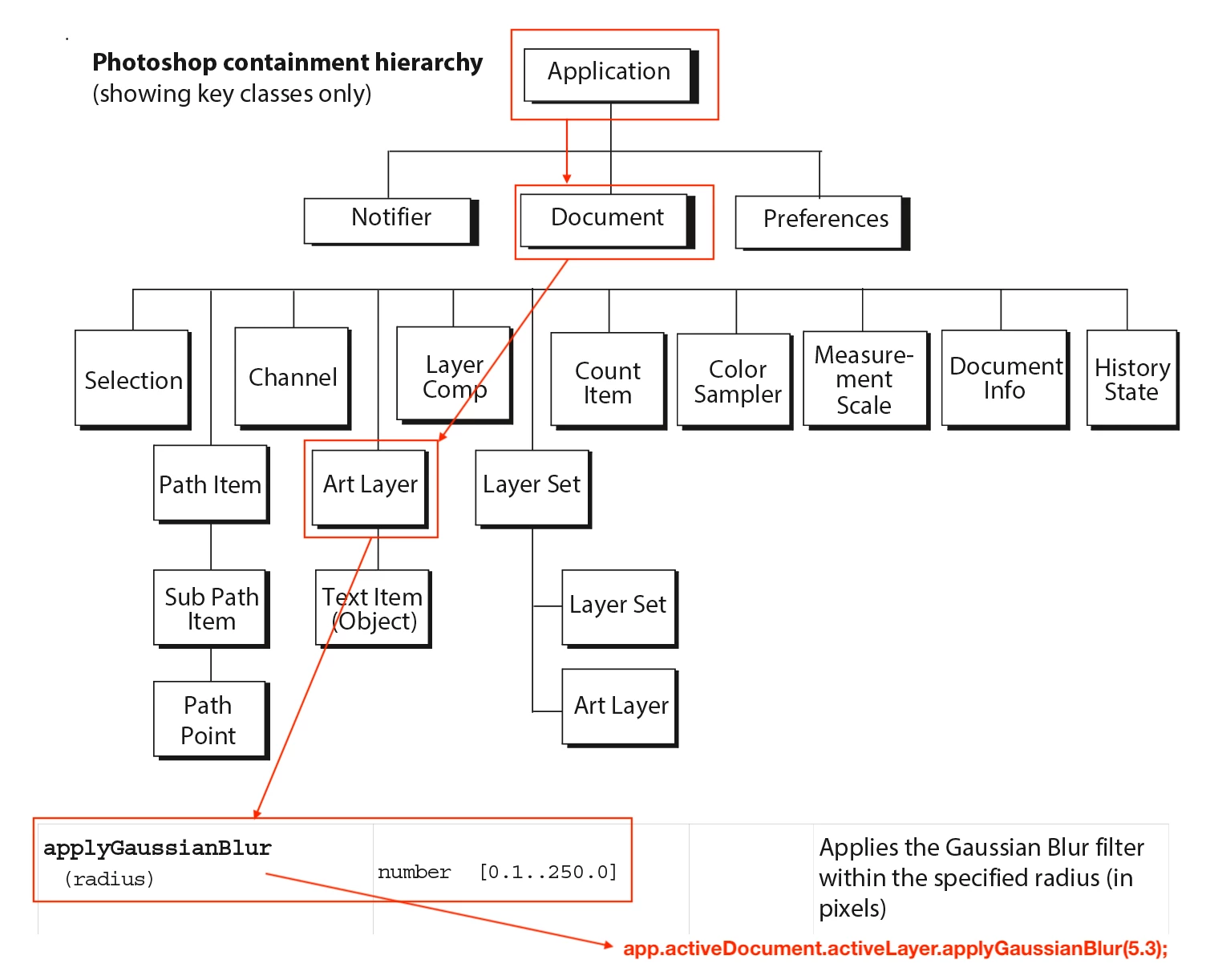
I still think looking at your current code would be best, however, without knowing where you are going wrong, the following diagram should hopefully help:


However, as the filter uses values in pixels, it is probably better to add further code to set pixels as the unit rather than just assume. This is probably OK for a simple filter, however, when resizing an image it pays to be specific.


2 replies

Stephen Marsh
Community Expert
Stephen MarshCommunity ExpertCorrect answer
Community Expert
November 27, 2020

I still think looking at your current code would be best, however, without knowing where you are going wrong, the following diagram should hopefully help:


However, as the filter uses values in pixels, it is probably better to add further code to set pixels as the unit rather than just assume. This is probably OK for a simple filter, however, when resizing an image it pays to be specific.


PerrowPhoto
Participating Frequently
November 27, 2020

Thank you so so much! That diagram definitely makes more sense now.

Stephen Marsh
Community Expert
Community Expert
November 27, 2020

They can be frustrating, however, they are the official references:


https://www.adobe.com/devnet/photoshop/scripting.html


Stephen Marsh
Community Expert
Community Expert
November 27, 2020

Post your code, that is the best way to get feedback and learn.