Known Participant
July 10, 2020
Answered

How to add alert in dropdwon menu ?

  • July 10, 2020
  • 2 replies
  • 561 views

var dialog = new Window("dialog");
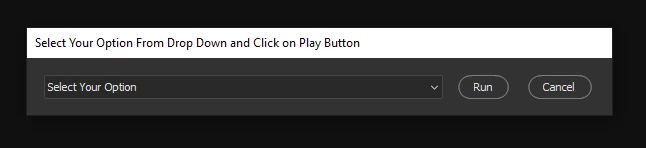
dialog.text = "Select Your Option From Drop Down and Click on Run Button";
dialog.preferredSize.width = 500;
dialog.preferredSize.height = 50;
dialog.orientation = "column";
dialog.alignChildren = ["center","top"];
dialog.spacing = 10;
dialog.margins = 16;

// GROUP1
// ======
var group1 = dialog.add("group", undefined, {name: "group1"});
group1.orientation = "row";
group1.alignChildren = ["left","center"];
group1.spacing = 10;
group1.margins = 0;

var dropdown1_array = ["Select Your Option","-","Option 01","-","Option 02","-","Option 03","-","Option 04","-","Option 05"];
var dropdown1 = group1.add("dropdownlist", undefined, undefined, {name: "dropdown1", items: dropdown1_array});
dropdown1.selection = 0;
dropdown1.preferredSize.width = 400;
dropdown1.preferredSize.height = 25;

var button1 = group1.add("button", undefined, undefined, {name: "button1"});
button1.text = "Run";

var button2 = group1.add("button", undefined, undefined, {name: "button2"});
button2.text = "Cancel";

dialog.show();
////can anyone help me adding alert (Option 01), alert(Option 02), alert(Option3), alert (option 4), alert (Option 5) in above jsx panel //////
This topic has been closed for replies.
Correct answer Manan Joshi

I am not sure what you mean by adding alert to dropdown as it does not specifically make much sense to me. Dropdown is meant to just display a list, we can add some code to trigger if the selection is changed in the list but that is not what you want as you specifically mention that you need to make it happen of click of Run button. So in my opinion we have to use the onclick of the run button itself. If you meant to say that you were not able to get the value of selection then maybe you could try the following

button1.onClick = function()
{
	alert(dropdown1.selection.text)
	dialog.close(1)
}


-Manan

2 replies

Legend
July 10, 2020

Use the onClick button handler,.test for the dropdown list selection, and go from there with a switch statement.

Community Expert
July 10, 2020

Can you be a bit more specific? On first look i see that you have successfully added values to the dropdown. What do you mean by alerts, do you want to alert the option users selects?


-Manan

-Manan
Known Participant
July 10, 2020

Hi..
when the user select Option 01 from drop down and click on RUN button ..one alert message should come alert (Option 01) .. when the user select Option 2 from drop down and click Run button alert message should come alert(Option 02)
I know how to add alret message in buttons
button1.onClick = function()
{
alert("any sample alert")
dialog.close(1)
};
but dont know how to add alert message in dropdown list when selected and clicked on run..Hope you understand my point 
Thanks

Manan JoshiCommunity ExpertCorrect answer
Community Expert
July 10, 2020

I am not sure what you mean by adding alert to dropdown as it does not specifically make much sense to me. Dropdown is meant to just display a list, we can add some code to trigger if the selection is changed in the list but that is not what you want as you specifically mention that you need to make it happen of click of Run button. So in my opinion we have to use the onclick of the run button itself. If you meant to say that you were not able to get the value of selection then maybe you could try the following

button1.onClick = function()
{
	alert(dropdown1.selection.text)
	dialog.close(1)
}


-Manan

-Manan