Known Participant
September 19, 2021
Answered

How to add some shadow after create layer mask?

  • September 19, 2021
  • 2 replies
  • 484 views

Hi,


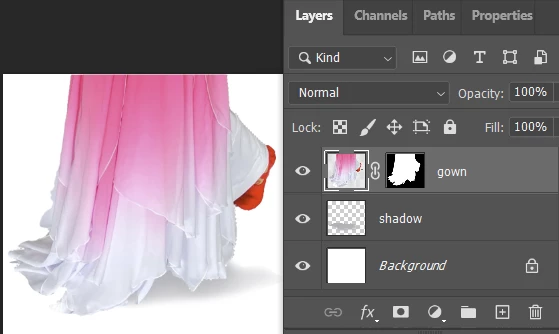
I'm trying to replace a background for a dancer.  After extract the dancer from original photo and put her in a new background, her figure looks too sharp even though I play with feather and soft edge setting a bit.  To make it look real, I want to add some shadow under her red dancing shoe (something like the attached screenshot).  How can I do it with PS?


Thanks & regards.
This topic has been closed for replies.
Correct answer barbara_a7746676

You might get some idea of what the shadow looked like if there was a shadow in the original photo before you removed the background.

It seems like the shadow would also be under the gown, not just a shadow for the foot. The foot is raised, therefore its shadow would be lighter than the shadow of the gown. Shadow would be on a layer underneath, as jane-e said.

Something like this:

2 replies

barbara_a7746676
barbara_a7746676Correct answer
Community Expert
September 19, 2021

You might get some idea of what the shadow looked like if there was a shadow in the original photo before you removed the background.

It seems like the shadow would also be under the gown, not just a shadow for the foot. The foot is raised, therefore its shadow would be lighter than the shadow of the gown. Shadow would be on a layer underneath, as jane-e said.

Something like this:

bjch512Author
Known Participant
September 19, 2021

Thank you for the details.


Regards.

jane-e
Community Expert
September 19, 2021

Add a new layer underneath this layer, then paint in the shadow with a soft brush and lower opacity.


~ Jane

bjch512Author
Known Participant
September 19, 2021

Thank you.  That makes sense.


Regards.