Participant
March 28, 2025
Answered

How to auto populate a bunch of shapes with incremental Lab colors from a reference color?

  • March 28, 2025
  • 6 replies
  • 1273 views

Please forgive me if I'm not using the right terminology, I'm a complete beginner to photoshop or any photo-editing tools.


I'm trying to create a bunch of printed color swatches for exact colorimetric visual determination of colored liquids, in CIE Lab color space. My idea is to create a bunch of 6 x 6" cards filled with a matrix of colored squares with the reference color starting in the center square, e.g. L a b = 70, 70, 0. 


Each square to the right of it increments the a value by +2, and -2 for each square to the left.

Each square to the top of it increments the b value by +2, and -2 for each square to the bottom.

Each card will represent increments in the L value.


Please advise me on the best approach to do this efficiently. I painstakingly entered the Lab values to each square, but I wish there is a way to automate this process. See attached.

Thank you so much!

 

Correct answer c.pfaffenbichler

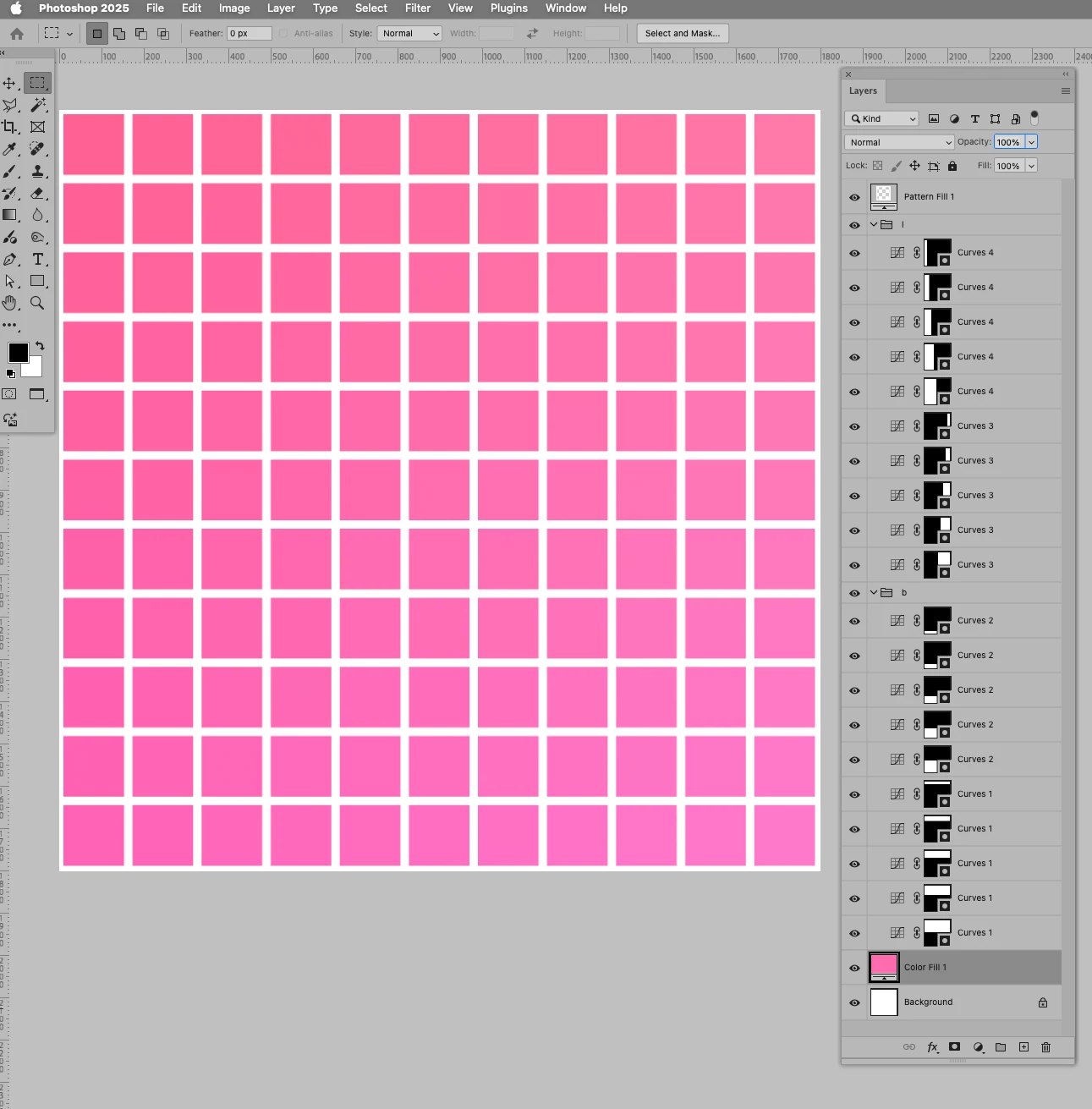
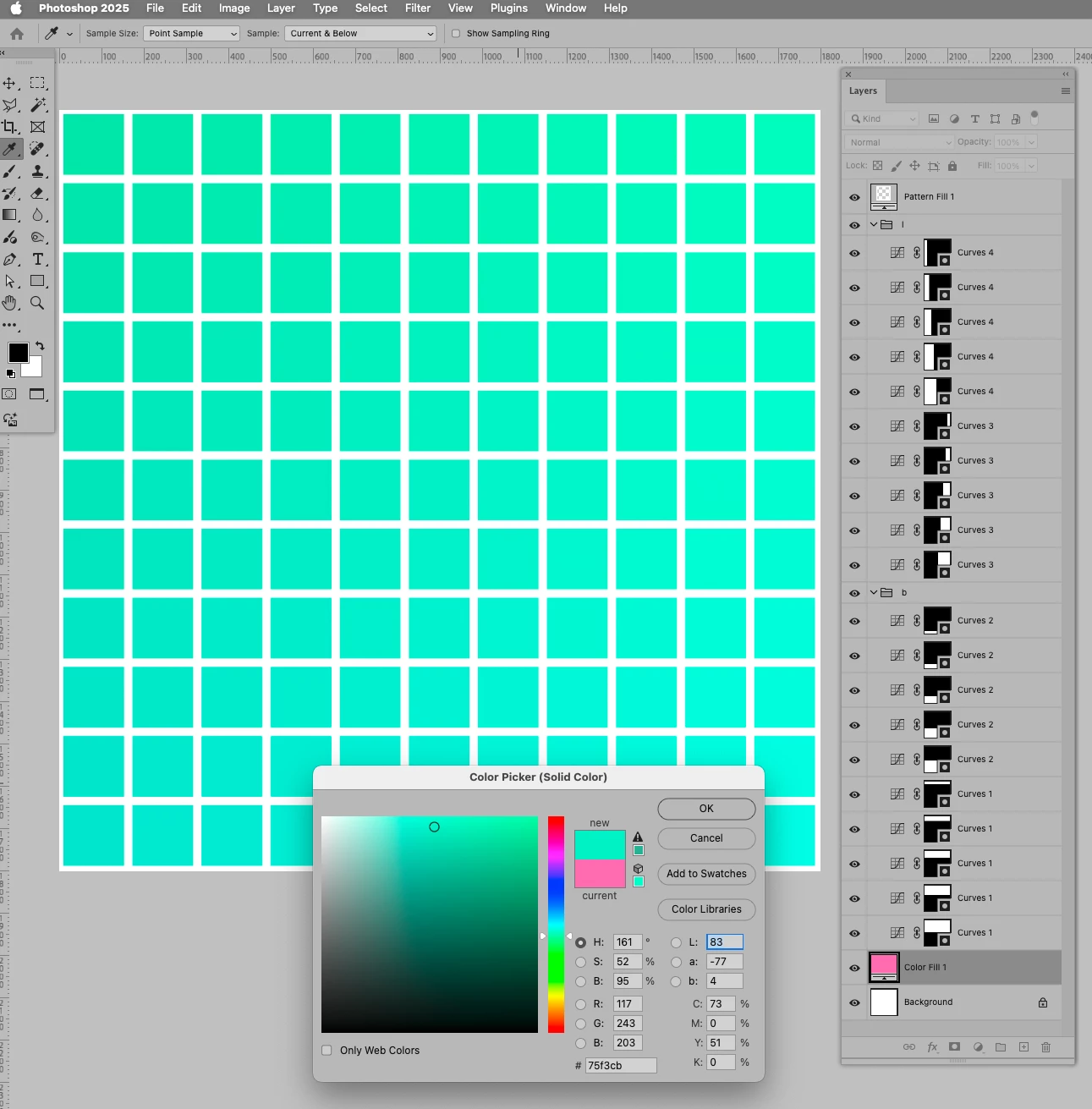
Another option would be using Curves Layers, that way one could change the base color quickly. 

6 replies

c.pfaffenbichler
Community Expert
c.pfaffenbichlerCommunity ExpertCorrect answer
Community Expert
March 31, 2025

Another option would be using Curves Layers, that way one could change the base color quickly. 

Participant
April 7, 2025

Thank you so much. I appreaciate your efforts, the curves method was what I was experimenting over the last few days. 

I ended up also using ChatGPT to write me a script which did exactly what I wanted. I sure learned quite a bit in short amount of time.

c.pfaffenbichler
Community Expert
Community Expert
April 7, 2025

But how did the Script I had posted fall short of the requirements? 

D Fosse
Community Expert
Community Expert
March 30, 2025

This is pointless if you don't have a very tightly controlled print process, with the correct icc profile for the printer/ink/paper, and your printer is really capable of reproducing subtle tonal gradations correctly. If this is grayscale, high end printers will have 3 or more grayscale inks for this purpose (black - gray - light gray).


You also need to make sure the lighting/viewing conditions are identical - and if this is a colored liquid, it will presumably be at least partly translucent. So how thick will the column of liquid be?

Trevor.Dennis
Community Expert
Community Expert
March 30, 2025

I wonder if the OP is trying to avoid the considerable cost of a lab grade spectrophotometer? The last six years of my working life was in the calibration lab at Ford Product Development.  We measured liquid opacity, but I never saw an instrument for measuring liquid colour. 

c.pfaffenbichler
Community Expert
Community Expert
March 30, 2025

Isn’t »exact colorimetric visual determination« an oxymoron? 

Wouldn’t it either be colorimetric or visual? 


If it is visual there might be some questions (that you may have already resolved, but just to make sure …): 

• Is your printing/output device calibrated? 

• Are there standardized viewing conditions in place for the prints and the liquids? 

c.pfaffenbichler
Community Expert
Community Expert
March 30, 2025

There should be a check to make sure the numbers don’t exceed the possible range on either side, but this might serve as a starting point. 

Edit: Sorry, there was a mistake. 

// 2025, use it at your own risk;
doStuff ();
////// create lab document with color fields //////
function doStuff () {
var originalRulerUnits = app.preferences.rulerUnits;
app.preferences.rulerUnits = Units.PIXELS;
// the settings:
var sideLength = 6;
var theEdge = 100;
var theNumber = 11;
var theSide = 100;
var theOffset = 2;
var theL = 50;
var theA = 0;
var theB = 0;
var x = Math.ceil(theNumber/2);
// create document;
var myDocument = app.documents.add(new UnitValue(sideLength, "in"), new UnitValue(sideLength, "in"), 300, "newFile", NewDocumentMode.LAB);
// create shape layers;
var theHorStrart = theEdge;
var theVerStrart = theEdge;
var theInterval = ((myDocument.width - theEdge * 2) - (theSide * theNumber)) / (theNumber-1);
// create shape layers;
var theB1 = theB-theOffset*x;
for (var n = 0; n < theNumber; n++) {
var theL1 = theL-theOffset*x;
theB1 = theB1+theOffset;
for (var m = 0; m < theNumber; m++) {
theL1 = theL1+theOffset;
rectangleShapeLayer ([theHorStrart+(theSide+theInterval)*m,theVerStrart+(theSide+theInterval)*n,theHorStrart+(theSide+theInterval)*m+theSide,theVerStrart+(theSide+theInterval)*n+theSide], theL1, theA, theB1, theL1+"_"+theA+"_"+theB1);
}
};
// reset;
app.preferences.rulerUnits = originalRulerUnits;
};
////// rectangle //////
function rectangleShapeLayer (theArray, theL, theA, theB, theName) {
var idPxl = charIDToTypeID( "#Pxl" );
var desc44 = new ActionDescriptor();
var ref9 = new ActionReference();
ref9.putClass( stringIDToTypeID( "contentLayer" ) );
desc44.putReference( charIDToTypeID( "null" ), ref9 );
var desc45 = new ActionDescriptor();
var desc46 = new ActionDescriptor();
var desc47 = new ActionDescriptor();
desc47.putDouble( stringIDToTypeID( "luminance" ), theL );
desc47.putDouble( stringIDToTypeID( "a" ), theA );
desc47.putDouble( stringIDToTypeID( "b" ), theB );
desc46.putObject( charIDToTypeID( "Clr " ), stringIDToTypeID( "labColor" ), desc47 );
var idsolidColorLayer = stringIDToTypeID( "solidColorLayer" );
desc45.putObject( charIDToTypeID( "Type" ), idsolidColorLayer, desc46 );
var desc48 = new ActionDescriptor();
desc48.putInteger( stringIDToTypeID( "unitValueQuadVersion" ), 1 );
desc48.putUnitDouble( charIDToTypeID( "Top " ), idPxl, theArray[1] );
desc48.putUnitDouble( charIDToTypeID( "Left" ), idPxl, theArray[0] );
desc48.putUnitDouble( charIDToTypeID( "Btom" ), idPxl, theArray[3] );
desc48.putUnitDouble( charIDToTypeID( "Rght" ), idPxl, theArray[2] );
desc48.putUnitDouble( stringIDToTypeID( "topRight" ), idPxl, 0.000000 );
desc48.putUnitDouble( stringIDToTypeID( "topLeft" ), idPxl, 0.000000 );
desc48.putUnitDouble( stringIDToTypeID( "bottomLeft" ), idPxl, 0.000000 );
desc48.putUnitDouble( stringIDToTypeID( "bottomRight" ), idPxl, 0.000000 );
desc45.putObject( charIDToTypeID( "Shp " ), charIDToTypeID( "Rctn" ), desc48 );
desc44.putObject( charIDToTypeID( "Usng" ), stringIDToTypeID( "contentLayer" ), desc45 );
desc44.putInteger( charIDToTypeID( "LyrI" ), 5 );
executeAction( charIDToTypeID( "Mk  " ), desc44, DialogModes.NO );
// =======================================================
var idlayer = stringIDToTypeID( "layer" );
var desc18 = new ActionDescriptor();
var ref6 = new ActionReference();
ref6.putEnumerated( idlayer, stringIDToTypeID( "ordinal" ), stringIDToTypeID( "targetEnum" ) );
desc18.putReference( stringIDToTypeID( "null" ), ref6 );
var desc19 = new ActionDescriptor();
desc19.putString( stringIDToTypeID( "name" ), theName );
desc18.putObject( stringIDToTypeID( "to" ), idlayer, desc19 );
executeAction( stringIDToTypeID( "set" ), desc18, DialogModes.NO );
};
Stephen Marsh
Community Expert
Community Expert
March 28, 2025

@harris_7195 – If it is ONLY the Lightness value that has to increment for each new chart, that would be much easier to script as this is a constant value for all of the patches.


Starting from your vector layer based chart, working on a duplicate file where it has been flattened, you can use channel operations to apply one channel to another in various blend modes and opacity, or use linear adjustments such as Brightness/Contrast set to legacy mode.

Stephen Marsh
Community Expert
Community Expert
March 28, 2025

I'm hoping some of the other scripting regulars chime in...


The first challenge that I see is in selecting each layer in the appropriate order to apply the adjustment to the base colour.


They are not named uniquely; they all have the same name of Rectangle 1.

If there was a logical and consistent pattern with a unique layer name or static Layer ID, a script could loop over the layers using the Layer ID order to select the next layer.


Here are labels on your current objects to help explain what I mean:


That being said, I'm still trying to work out if that would be starting from the centre "parent" square, or from the upper left square or somewhere else.


This would require creating each rectangle in the required order to produce the required static Layer ID.


But perhaps there'a a better way...