
Known Participant
June 14, 2021
Answered

How to automatically deselect lasso selection after applying gaussian blur?

  • June 14, 2021
  • 4 replies
  • 4011 views

So this used to be the default, I would lasso tool to make a selection and then gaussian blur (doing frequency seperation retouching). After I applied my gaussian blur to the selection it would automatically deselect for me so I could quickly just make my new selection without having to manually deseleect with ctrl+d every time. How can I make my Photoshop 2021 (Windows 10) automatically do this again like it used to? 


Thank you!
This topic has been closed for replies.
Correct answer JJMack

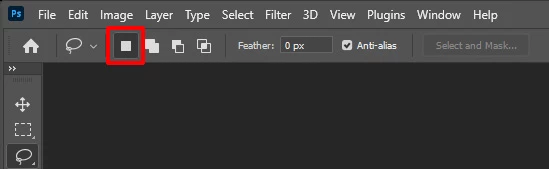
Select the lasso tool the look at the tools option bar. Make sure you have the icon new selection still active.  You most likely have it in Add mode now.

4 replies

Stephen Marsh
Community Expert
Community Expert
June 14, 2021


I agree with the other forum members, this is not default behaviour.


Perhaps you had an events based script installed that automatically ran the deslect command after the Gaussian Blur filter was run and you forgot that it was installed...


Even without a special events script, one can setup the Script Events Manager to automatically run a script or action set/action when the Gaussian Blur event is triggered:


Event Name: Gaussian Blur

Descriptive Label: GsnB


That being said, it would be prudent to script a conditional check so that the script would only be fired if certain criteria were met, perhaps based on layer name for example. So if the frequency separation layer was consistently named "low frequency" then run the deselect command after using Gaussian Blur, otherwise the selection would not be deselected for any other layer when Gaussian Blur was run.


JJMack
Community Expert
Community Expert
June 14, 2021

Normals operation of the lasso tool is to delselect and start a new selection unless a modifier key is pressed or a lasso tool option other the new selection is set.

JJMack
Stephen Marsh
Community Expert
Community Expert
June 14, 2021

I don't believe that is the issue here JJMack.


I understand the retouching method and workflow, I have been there and done that many times in years gone by.


The OP has selected an area. That is it. They then blur the selected area. That is it, don't overthink it, this is just a selection, it could have come from any method that creates a selection, the method used to create the selection is not the critical point here. The OP's expectation is that after blurring, the selection should be deselected automatically, without the need for deselecting via keyboard shortcuts, menus etc. The trigger here is that after running the filter, the selection is deselected.

JJMack
Community Expert
JJMackCommunity ExpertCorrect answer
Community Expert
June 14, 2021

Select the lasso tool the look at the tools option bar. Make sure you have the icon new selection still active.  You most likely have it in Add mode now.

JJMack
Known Participant
June 15, 2021

Thank you sir this was the issue.

davescm
Community Expert
Community Expert
June 14, 2021

I can't remember Photoshop ever deselecting after applying a filter to a pixel layer.


It does deselect after adding the filter as a smart filter (i.e. apply the selection and filter to a smart object) - so that the filter mask now contains the selected area.


Dave

c.pfaffenbichler
Community Expert
Community Expert
June 14, 2021

Why would Photoshop deselct a Selection after applying a Filter? 


Could you please post screenshots with the pertinent Panels (Toolbar, Layers, Options Bar, …) visible?