Legend
July 28, 2021
Answered

How to calculate the new boundaries of an object after transformation?

  • July 28, 2021
  • 2 replies
  • 565 views

I have an object inside a layer, the initial boundaries of which are known, but I cannot get them directly (this is part of the image) . Object are described in the standard way in document coordinates - top, left, right, bottom. I need to perform a series of transformations of the entire layer and after that get the new coordinates of the object inside it (transformation in this case is only a change in scale, image rotation is not performed). I easily coped with move (x+dx) (y+dy), but I got stuck on the transformation with the center set manually (the coordinates of this point are known - x, y). It seems that I understand this combination of move + scale and a proportional change coordinates is required depending on their distance from the point x,y, but I cannot deduce the correct formula for calculating the new values ​​of top, left, right, bottom. Can someone help me with this?
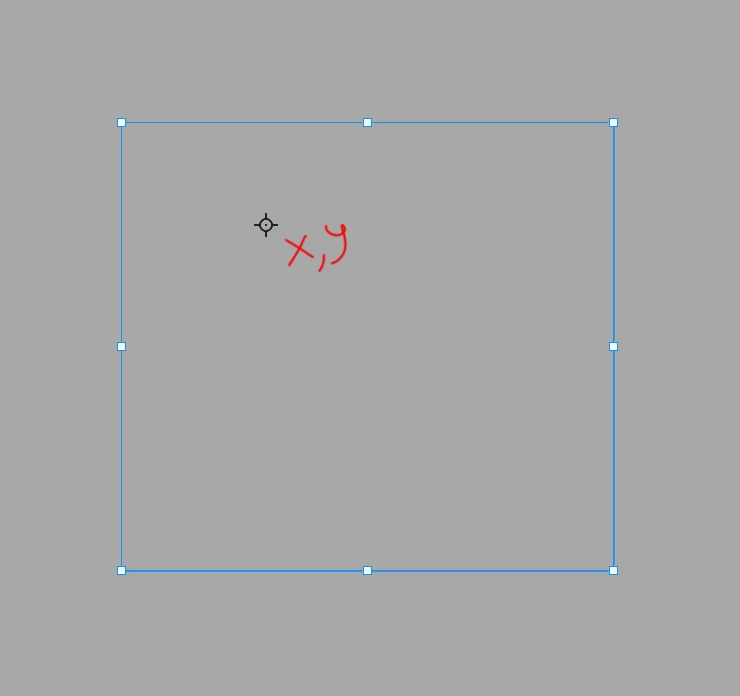
P.S. it is clear that we can copy an object to a new layer and perform its transformation with the same parameters as the main layer (this is how the script works at the moment), but I want to speed up the script and get rid of unnecessary transformations (that is, get coordinates by calculation )

This topic has been closed for replies.
Correct answer jazz-y
 this.transform = function (dX, dY, scale, x, y, subject) {
        (r = new ActionReference()).putEnumerated(s2t('layer'), s2t('ordinal'), s2t('targetEnum'));
        (d = new ActionDescriptor()).putReference(s2t('null'), r);
        d.putEnumerated(s2t('freeTransformCenterState'), s2t('quadCenterState'), s2t('QCSIndependent'));
        ((d1 = new ActionDescriptor())).putUnitDouble(s2t('horizontal'), s2t('pixelsUnit'), x);
        d1.putUnitDouble(s2t('vertical'), s2t('pixelsUnit'), y);
        d.putObject(s2t('position'), s2t('paint'), d1);
        (d2 = new ActionDescriptor()).putUnitDouble(s2t('horizontal'), s2t('pixelsUnit'), dX);
        d2.putUnitDouble(s2t('vertical'), s2t('pixelsUnit'), dY);
        d.putObject(s2t('offset'), s2t('offset'), d2);
        d.putUnitDouble(s2t('width'), s2t('percentUnit'), scale);
        d.putUnitDouble(s2t('height'), s2t('percentUnit'), scale);
        d.putEnumerated(s2t('interfaceIconFrameDimmed'), s2t('interpolationType'), s2t('bicubic'));
        executeAction(s2t('transform'), d, DialogModes.NO);

        if (subject) {
            with (subject) {
                var dV = (height * scale / 100 - (bottom - top)),
                    dH = (width * scale / 100 - (right - left));
                top = top - (dV * (y - top) / height) + dY
                bottom = bottom + (dV * (bottom - y) / height) + dY
                left = left - (dH * (x - left) / width) + dX
                right = right + (dH * (right - x) / width) + dX
                height = height * scale / 100
                width = width * scale / 100
            }
    }

* where subject is object with bounding box coordinates

2 replies

Kukurykus
Legend
July 28, 2021

What kind of layer is it? Do you mean by layer the entire gray area, while the blue square is an object with some x, y point inside? Or gray area is some background of other layer while the mentioned layer is a blue square, that said, the x, y object would be then an object?

jazz-yAuthor
Legend
July 28, 2021

gray area - layer, blue square - object in this layer

jazz-yAuthorCorrect answer
Legend
July 28, 2021
 this.transform = function (dX, dY, scale, x, y, subject) {
        (r = new ActionReference()).putEnumerated(s2t('layer'), s2t('ordinal'), s2t('targetEnum'));
        (d = new ActionDescriptor()).putReference(s2t('null'), r);
        d.putEnumerated(s2t('freeTransformCenterState'), s2t('quadCenterState'), s2t('QCSIndependent'));
        ((d1 = new ActionDescriptor())).putUnitDouble(s2t('horizontal'), s2t('pixelsUnit'), x);
        d1.putUnitDouble(s2t('vertical'), s2t('pixelsUnit'), y);
        d.putObject(s2t('position'), s2t('paint'), d1);
        (d2 = new ActionDescriptor()).putUnitDouble(s2t('horizontal'), s2t('pixelsUnit'), dX);
        d2.putUnitDouble(s2t('vertical'), s2t('pixelsUnit'), dY);
        d.putObject(s2t('offset'), s2t('offset'), d2);
        d.putUnitDouble(s2t('width'), s2t('percentUnit'), scale);
        d.putUnitDouble(s2t('height'), s2t('percentUnit'), scale);
        d.putEnumerated(s2t('interfaceIconFrameDimmed'), s2t('interpolationType'), s2t('bicubic'));
        executeAction(s2t('transform'), d, DialogModes.NO);

        if (subject) {
            with (subject) {
                var dV = (height * scale / 100 - (bottom - top)),
                    dH = (width * scale / 100 - (right - left));
                top = top - (dV * (y - top) / height) + dY
                bottom = bottom + (dV * (bottom - y) / height) + dY
                left = left - (dH * (x - left) / width) + dX
                right = right + (dH * (right - x) / width) + dX
                height = height * scale / 100
                width = width * scale / 100
            }
    }

* where subject is object with bounding box coordinates

Kukurykus
Legend
July 28, 2021

Can you edit your code to working version to let me try out it on some layer with an object inside?

jazz-yAuthor
Legend
July 28, 2021

It is difficult for me to provide a working code, since I am getting the coordinates of the object with the layer from another program. But there is no difference, you can just calculate the bounding rect of the current layer after transformation.


var lr = new AM('layer'),
subject = lr.descToObject(lr.getProperty('boundsNoEffects'));

lr.transform(100, 200, 150, 70, 120, subject)
var newBounds = lr.descToObject(lr.getProperty('boundsNoEffects'));
alert ('calculated:\ntop: '+subject.top +', left: ' +subject.left + ', right: ' + subject.right + ', bottom: ' + subject.bottom + '\nreal:\ntop: '
+newBounds.top +', left: ' +newBounds.left + ', right: ' +newBounds.right + ', bottom: ' + newBounds.bottom + '\nreal:\n')

function AM(target, order) {
    var s2t = stringIDToTypeID,
        t2s = typeIDToStringID;

    target = s2t(target)
    
    this.getProperty = function (property, descMode, id, idxMode, parent, parentIdx) {
        property = s2t(property);
        (r = new ActionReference()).putProperty(s2t('property'), property);
        id != undefined ? (idxMode ? r.putIndex(target, id) : r.putIdentifier(target, id)) :
            r.putEnumerated(target, s2t('ordinal'), order ? s2t(order) : s2t('targetEnum'));
        if (parent) r.putIndex(s2t(parent), parentIdx);
        return descMode ? executeActionGet(r) : getDescValue(executeActionGet(r), property)
    }

    this.descToObject = function (d) {
        var o = {}
        for (var i = 0; i < d.count; i++) {
            var k = d.getKey(i)
            o[t2s(k)] = getDescValue(d, k)
        }
        return o
    }

    this.transform = function (dX, dY, scale, x, y, subject) {
        (r = new ActionReference()).putEnumerated(s2t('layer'), s2t('ordinal'), s2t('targetEnum'));
        (d = new ActionDescriptor()).putReference(s2t('null'), r);
        d.putEnumerated(s2t('freeTransformCenterState'), s2t('quadCenterState'), s2t('QCSIndependent'));
        ((d1 = new ActionDescriptor())).putUnitDouble(s2t('horizontal'), s2t('pixelsUnit'), x);
        d1.putUnitDouble(s2t('vertical'), s2t('pixelsUnit'), y);
        d.putObject(s2t('position'), s2t('paint'), d1);
        (d2 = new ActionDescriptor()).putUnitDouble(s2t('horizontal'), s2t('pixelsUnit'), dX);
        d2.putUnitDouble(s2t('vertical'), s2t('pixelsUnit'), dY);
        d.putObject(s2t('offset'), s2t('offset'), d2);
        d.putUnitDouble(s2t('width'), s2t('percentUnit'), scale);
        d.putUnitDouble(s2t('height'), s2t('percentUnit'), scale);
        d.putEnumerated(s2t('interfaceIconFrameDimmed'), s2t('interpolationType'), s2t('bicubic'));
        executeAction(s2t('transform'), d, DialogModes.NO);

        if (subject) {
            with (subject) {
                var dV = (height * scale / 100 - (bottom - top)),
                    dH = (width * scale / 100 - (right - left));
                top = top - (dV * (y - top) / height) + dY
                bottom = bottom + (dV * (bottom - y) / height) + dY
                left = left - (dH * (x - left) / width) + dX
                right = right + (dH * (right - x) / width) + dX
                height = height * scale / 100
                width = width * scale / 100
            }
        }
    }

    function getDescValue(d, p) {
        switch (d.getType(p)) {
            case DescValueType.OBJECTTYPE: return (d.getObjectValue(p));
            case DescValueType.LISTTYPE: return d.getList(p);
            case DescValueType.REFERENCETYPE: return d.getReference(p);
            case DescValueType.BOOLEANTYPE: return d.getBoolean(p);
            case DescValueType.STRINGTYPE: return d.getString(p);
            case DescValueType.INTEGERTYPE: return d.getInteger(p);
            case DescValueType.LARGEINTEGERTYPE: return d.getLargeInteger(p);
            case DescValueType.DOUBLETYPE: return d.getDouble(p);
            case DescValueType.ALIASTYPE: return d.getPath(p);
            case DescValueType.CLASSTYPE: return d.getClass(p);
            case DescValueType.UNITDOUBLE: return (d.getUnitDoubleValue(p));
            case DescValueType.ENUMERATEDTYPE: return [t2s(d.getEnumerationType(p)), t2s(d.getEnumerationValue(p))];
            default: break;
        };
    }
}

PS. I would like to recalculate coordinates after rotation. Now I don't need it, but one day it might come in handy.