

michaelp37878722
Participating Frequently
July 29, 2020
Question

How to center layer/canvas?

  • July 29, 2020
  • 2 replies
  • 378 views


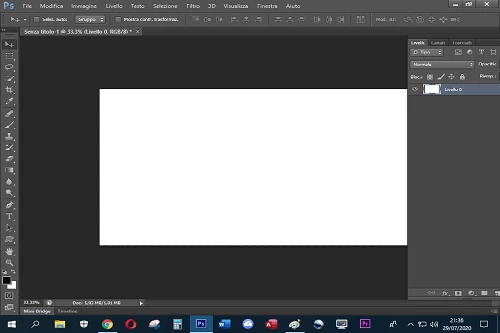
Hello guys, i still struggle to understand the difference between layer, canvas and work space. i created a new document, and the white canvas was already all moved to the right, i right clicked in the layer panel and and chose "layer from background", and turned the background into a layer...but it's still moved to the right.


i tried to drag it to the center but only the white part moves, the trasparent background behind it stays there, moved to the right. How can i move it to the center? Thank you


This topic has been closed for replies.

2 replies

jane-e
Community Expert
Community Expert
July 29, 2020

"i still struggle to understand the difference between layer, canvas and work space."


Hi


Workspace

"You create and manipulate your documents and files using various elements, such as panels, bars, and windows. Any arrangement of these elements is called a workspace."


Layer

"Photoshop layers are like sheets of stacked acetate. You can see through transparent areas of a layer to the layers below."


Canvas (your document)

"When you create a document in Photoshop, instead of beginning with a blank canvas, you can choose from a wide variety of templates, including templates from Adobe Stock."


Read these two Help files, and ask again if anything needs more clarification:

https://helpx.adobe.com/photoshop/using/workspace-basics.html

https://helpx.adobe.com/photoshop/using/layer-basics.html


Try using the menu options in the View menu to center your canvas.


~ Jane

michaelp37878722
Participating Frequently
July 29, 2020

thank you problem solved, thanks!

JJMack
Community Expert
Community Expert
July 29, 2020

It you turn your workspace rulers you will have a good point reference  for your document canvas location size and content. Point 0,0 is your Canvas top left origin point. This canvas is 700px wide 500px high. Actual image pixels are being displayed view scale is 100%

Viewed at 200% the height of the canvas does not fit in Photoshop's image window area.

It looks like your layers palette may be covering part of your image window that has your canvas centered in it. Note the scroll bar in the right side of my image window whet the canvas doe bot fit in the winfoe.  The right side of your image window is covered by your layer palette.  It you dock your layer palette this will not happen

JJMack
JJMack
Community Expert
Community Expert
July 29, 2020

When there are scrollbars you can use them to position the canvas in the image window

JJMack