Laddernose
Participating Frequently
September 28, 2022
Answered

How to change copyright information in .CR2 RAW files

  • September 28, 2022
  • 1 reply
  • 847 views

I have used a rented canon body. Forgot to change/remove the copyright information of previous user. Now how can I remove them in the .CR2 RAW files. Thank you!

This topic has been closed for replies.
Correct answer jazz-y

Canon cameras usually write in IPTC core - this section is editable in most EXIF editors.


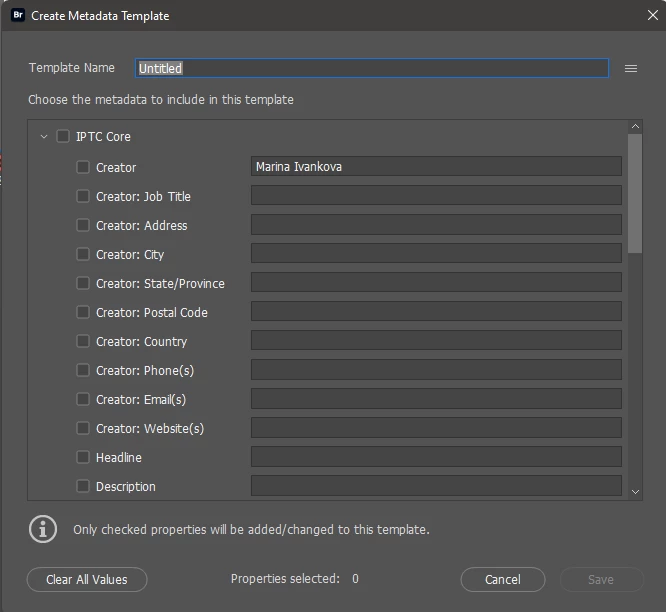
@Laddernose try editing the metadata in Bridge (there is not only the ability to edit one file, but also convenient templates for batch replacing metadata)
1 reply

Stephen Marsh
Community Expert
Community Expert
September 28, 2022

That info is baked into the raw files for Adobe apps. Adobe apps don't/shouldn't directly edit the raw file. You would need to "indirectly" edit via the info in the XMP sidecar which holds all writable data used in Adobe apps.


Testing on duplicates of the original raw files, Canon or 3rd party software may be able to directly edit the raw files, however, they may or may not corrupt or otherwise screw up the files. Can you provide a download link to a raw file for testing?


Looking at one of my CR2 files with ExifTool, there are various "personal" fields such as:


[IFD0] Artist

[IFD0] Copyright

[Canon] OwnerName
[Canon] SerialNumber

[Canon] InternalSerialNumber


Can you copy/paste the XMP code from the File > File Info > Raw tab so that the forum can be sure of the exact data you would like to change?


jazz-yCorrect answer
Legend
September 28, 2022

Canon cameras usually write in IPTC core - this section is editable in most EXIF editors.


@Laddernose try editing the metadata in Bridge (there is not only the ability to edit one file, but also convenient templates for batch replacing metadata)

Laddernose
Participating Frequently
September 28, 2022
Thank you. Let me try Bridge.