
Inspiring
February 3, 2017
Answered

How to change from language in photoshop CC2017

  • February 3, 2017
  • 3 replies
  • 24711 views

I've bought some Envato plugins (scripts) but to have them work it has to be an English version as I do have a Dutch one.

I've been looking on this forum and find the same solution several times.

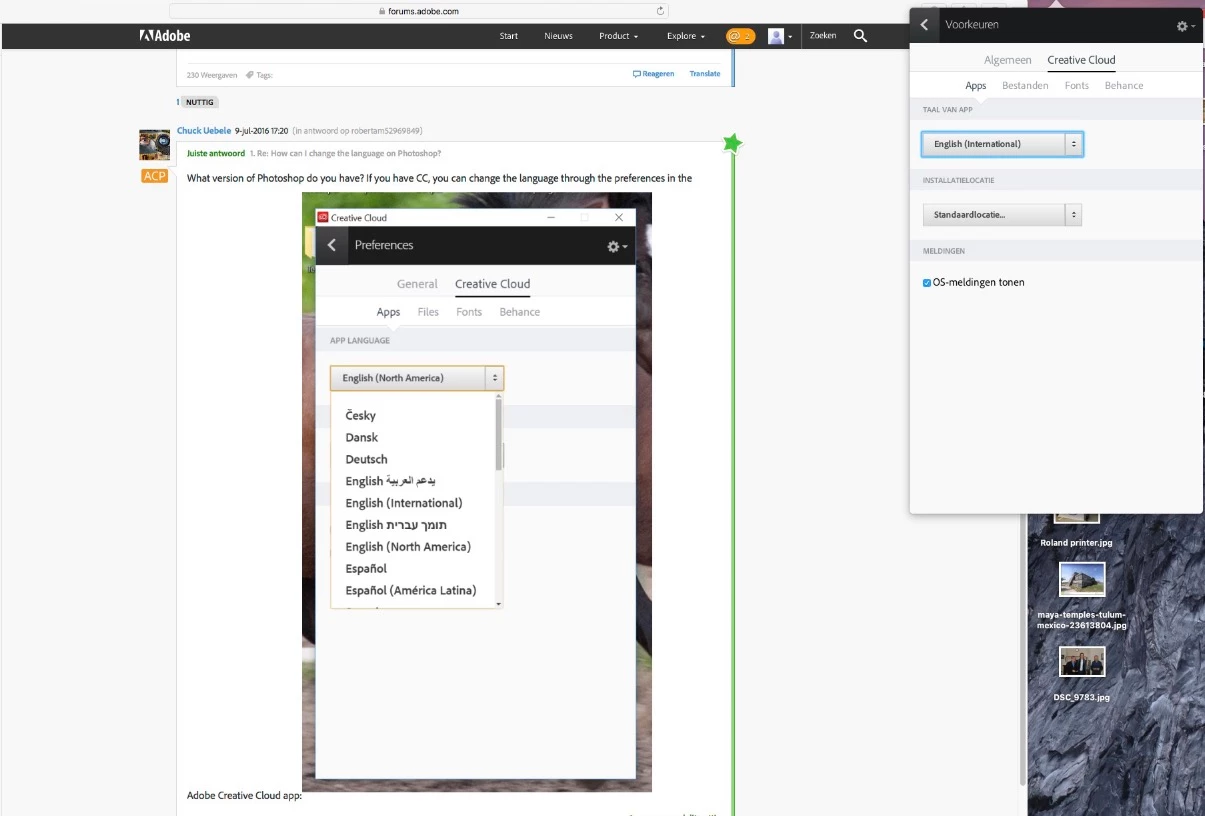
Only if I change the language prefs in the Creative Cloud and do a restart I'm still in a Dutch version?
    This topic has been closed for replies.
    Correct answer italosan

    Try by going in Edit>Preferences>Interface: Interface language

    If you get only Dutch try restarting you computer.

    If nothing happens, as last chance, try this

    close PS.go to: C:\Program Files\Adobe\Adobe Photoshop CC2017\Locales\YOUR_LANGUAGE\Support Files

    find this file tw10428.dat and modify name in tw10428.dat.backup

    Now your PS is in english, if you want to bring it to your language just remove .backup to that filename and bring it back as tw10428.dat; than go to CreativeCloud setting and set Dutch as app language

    Please mind that after changing language in English by this method, you may need to delete and reinstall the software to bring it back at your language, so do it carefully

    3 replies

    italosan
    Community Expert
    Community Expert
    February 6, 2017

    spyderABCc.pfaffenbichler

    This is a support forum, not a place to argue.

    Please stop it now, otherwise the thread will be closed and the messages deleted.

    Thank you

    Italo

    spyderABCAuthor
    Inspiring
    February 6, 2017

    sorry wasn’t ment that way - very glad I was helped.

    Best,

    Rik Claus

    (Edited by Moderator)

    italosan
    Community Expert
    italosanCommunity ExpertCorrect answer
    Community Expert
    February 3, 2017

    Try by going in Edit>Preferences>Interface: Interface language

    If you get only Dutch try restarting you computer.

    If nothing happens, as last chance, try this

    close PS.go to: C:\Program Files\Adobe\Adobe Photoshop CC2017\Locales\YOUR_LANGUAGE\Support Files

    find this file tw10428.dat and modify name in tw10428.dat.backup

    Now your PS is in english, if you want to bring it to your language just remove .backup to that filename and bring it back as tw10428.dat; than go to CreativeCloud setting and set Dutch as app language

    Please mind that after changing language in English by this method, you may need to delete and reinstall the software to bring it back at your language, so do it carefully

    Participating Frequently
    June 6, 2018

    Italosan,

    thank you very much.  i just got English working on my Japanese computer!  very happy.

    arigato!

    c.pfaffenbichler
    Community Expert
    Community Expert
    February 3, 2017

    Change the language setting of your Creative Cloud apps

    Quote:

    Note:

    If you want to apply the language change to an app that you have already installed on your computer, change the language preference, and then uninstall and reinstall the app. You can do this easily in the Creative Cloud desktop app.

    spyderABCAuthor
    Inspiring
    February 4, 2017

    c.pfaffenbichlerThanks for your reply BUT could you please stop putting that word 'easily' in the instructions because it ain't !

    Let me explain again. When I do need to run an Envato action on a picture it needs to be an English PS version otherwise the actions do stop after the first attempt. That's the ONLY time I do need that English PS version so (even as it doesn't work yet) I'll need to do that every time I would like to use one of those Envato scripts on a picture?

    As I did change that language and restarted my Mac I still got a Dutch version. Now I see i would have to install that app and reinstall and do that all over again after I used that script and whenever I want to run that action on a second picture I have to do that all over again ????

    May I say that I also do need to reinstall several 3-party plugins as well as they are gone after a reinstall !

    So easily, sorry I don't think so...

    italosanAlso thanks but as i said I'll put those Envato scripts in my basket...

    spyderABCAuthor
    Inspiring
    February 4, 2017

    sorry, in my waste basket !