
Participant
November 30, 2023
Answered

How to change menu text color

  • November 30, 2023
  • 2 replies
  • 361 views

Hi,

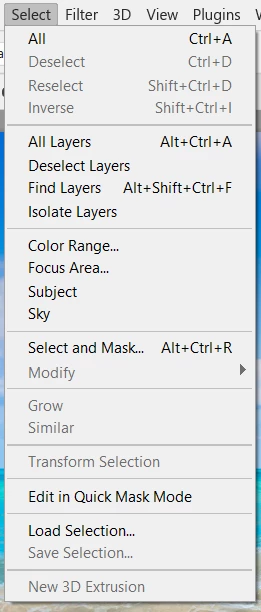
I downloaded Photoshop at my workplace and the text in the menu looks grayed.

For example I chose the "select" tab which some commands should be disabled and some don't, but they all looks the same in color.

Someone have an idea how to solve this? Is it just me?
This topic has been closed for replies.
Correct answer Jeff Arola

Looks about the same for me here on Windows 10, although on Windows it seems the active items and greyed out menu items get harder to tell apart the bigger the menu text is.


Maybe try adjusting the Clear Type settings.

2 replies

Jeff Arola
Community Expert
Jeff ArolaCommunity ExpertCorrect answer
Community Expert
November 30, 2023

Looks about the same for me here on Windows 10, although on Windows it seems the active items and greyed out menu items get harder to tell apart the bigger the menu text is.


Maybe try adjusting the Clear Type settings.

Participant
December 3, 2023

Tried it now, not working unfortunately...

Ged_Traynor
Community Expert
Community Expert
November 30, 2023

@Israel284804637deb your menu looks fine to me, options will become selectable depending on what you're doing, if you're referring to the options interface been gray, well that's something that can't be changed