Inspiring
February 18, 2022
Question

how to change work area for several pages

  • February 18, 2022
  • 4 replies
  • 424 views

Hello,

I have imported in Photoshop a 4 pages PDF. So you can see here the 4 tabs at the top :
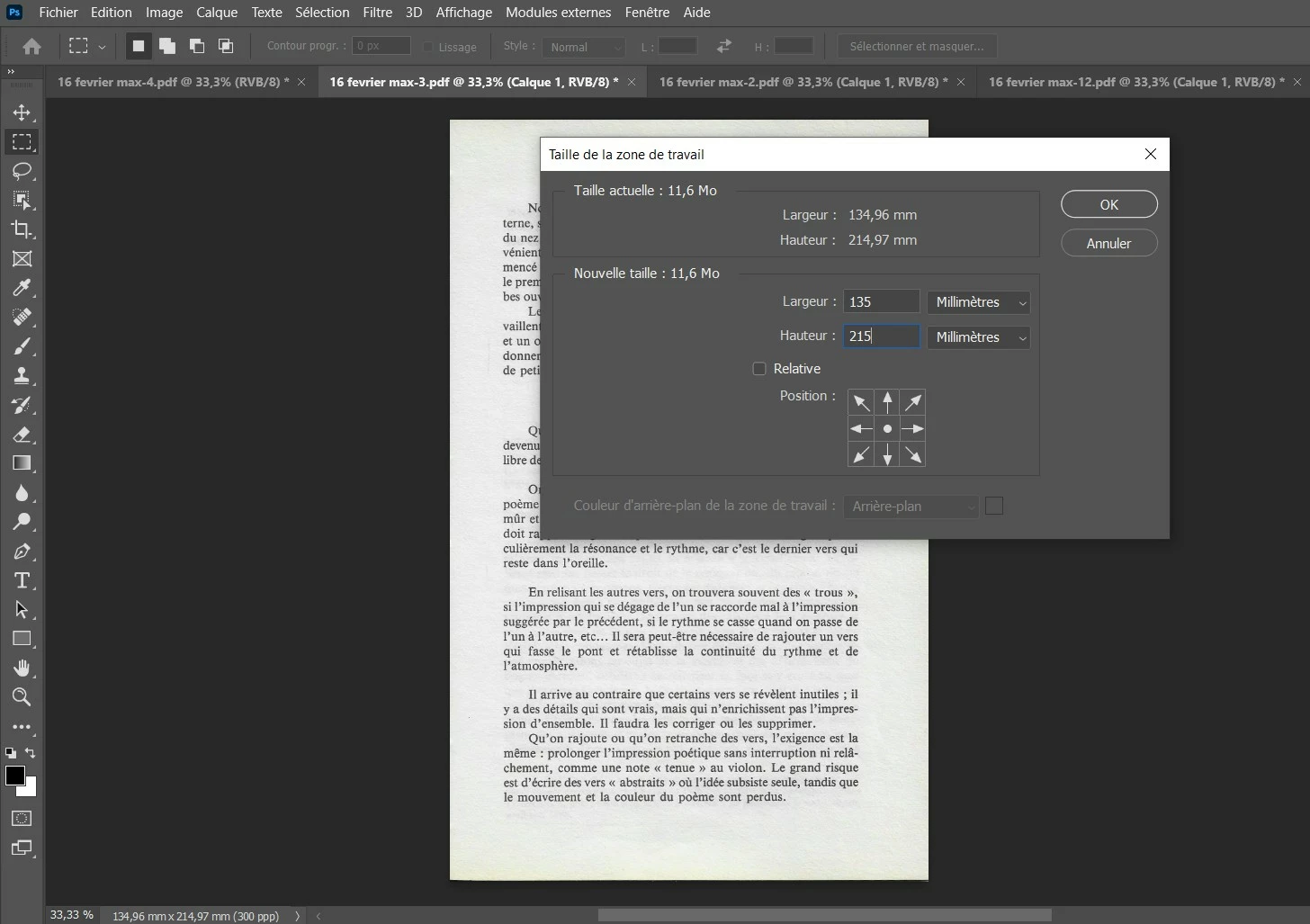
 

I would like to change the work area for all pages/images/tab at the same time.

By example in the screenshot I have changed the work area to 135 mm x 215 mm, but if I do that, it changes only for the active image. I would like to make this setting for all images/tab at the same time.

How to do this ?

My goal is to obtain a 135 x 215 mm PDF (without distorting the pages).

This topic has been closed for replies.

4 replies

jane-e
Community Expert
Community Expert
February 22, 2022

@pierret18811376 


Is this what you are trying to achieve?

  • from 134,96 mm to 135 mm
  • from 214,97 mm to 215 mm


Instead of 300 ppi (pixels per inch), the bottom left corner says 300 ppp. What does the third "p" stand for?


I live in the one part of the world that does not use metrics, but Photoshop cannot give you an image size that includes a partial pixel and will do the kind of rounding you are seeing when faced with an impossible situation.


Jane


Inspiring
February 22, 2022

ppp is in french, and is the same as ppi in english.

Stephen Marsh
Community Expert
Community Expert
February 22, 2022

@pierret18811376 


How did the scripts work for you?

Inspiring
February 22, 2022

Sorry, but I give up Photoshop (I have not complete CC subscription), so I have not tried your scripts.

Stephen Marsh
Community Expert
Community Expert
February 22, 2022

@pierret18811376 wrote:

Sorry, but I give up Photoshop (I have not complete CC subscription), so I have not tried your scripts.


Sorry, I don't understand. You posted a question and on the same day I provided two solutions, but three days later you reply that you have stopped using Photoshop?

Stephen Marsh
Community Expert
Community Expert
February 19, 2022

This version uses content aware fill (therefore, it's slower) – in an attempt to seamlessly extend the variable background colour:


/*
Resize Canvas For All Open Docs.jsx
Stephen Marsh, v2.0 - 19th February 2022
https://community.adobe.com/t5/photoshop-ecosystem-discussions/how-to-change-work-area-for-several-pages/td-p/12761765
*/

#target photoshop

// CHECK FOR OPEN DOCS
if (documents.length) {

    // SET THE CURRENT DOC AS ORIGINAL DOC
    var actDoc = activeDocument;

    // LOOP OVER OPEN FILES
    for (var i = 0; i < documents.length; i++) {
        activeDocument = documents[i];
        if (activeDocument.activeLayer.isBackgroundLayer) {
            activeDocument.activeLayer.name = 'Background';
            extendCanvas();
        } else {
            extendCanvas();
        }

    }

    // RETURN TO THE ORIGINAL DOC
    activeDocument = actDoc;

    // END OF SCRIPT NOTIFICATION
    app.beep();

    // ALERT IF NO DOCS OPEN
} else {
    alert('You must have a document open!');
}

// FUNCTIONS

function extendCanvas() {
    // Content aware fill requires a certain amount of blank space to work without erroring
    activeDocument.resizeCanvas(UnitValue(137, "mm"), UnitValue(217, "mm"), AnchorPosition.MIDDLECENTER);
    loadLayerTrans();
    activeDocument.selection.invert();
    contentAwareFill(true, false, false, false, 100);
    activeDocument.selection.deselect();
    // Final required size
    activeDocument.resizeCanvas(UnitValue(135, "mm"), UnitValue(215, "mm"), AnchorPosition.MIDDLECENTER);
    activeDocument.flatten();
}

function loadLayerTrans() {
	var s2t = function (s) {
		return app.stringIDToTypeID(s);
	};
	var descriptor = new ActionDescriptor();
	var reference = new ActionReference();
	var reference2 = new ActionReference();
	reference.putProperty(s2t("channel"), s2t("selection"));
	descriptor.putReference(s2t("null"), reference);
	reference2.putEnumerated(s2t("channel"), s2t("channel"), s2t("transparencyEnum"));
	descriptor.putReference(s2t("to"), reference2);
	executeAction(s2t("set"), descriptor, DialogModes.NO);
}

function contentAwareFill(contentAwareColorAdaptationFill, contentAwareRotateFill, contentAwareScaleFill, contentAwareMirrorFill, opacity) {
	var s2t = function (s) {
		return app.stringIDToTypeID(s);
	};
	var descriptor = new ActionDescriptor();
	descriptor.putEnumerated(s2t("using"), s2t("fillContents"), s2t("contentAware"));
	descriptor.putBoolean(s2t("contentAwareColorAdaptationFill"), contentAwareColorAdaptationFill);
	descriptor.putBoolean(s2t("contentAwareRotateFill"), contentAwareRotateFill);
	descriptor.putBoolean(s2t("contentAwareScaleFill"), contentAwareScaleFill);
	descriptor.putBoolean(s2t("contentAwareMirrorFill"), contentAwareMirrorFill);
	descriptor.putUnitDouble(s2t("opacity"), s2t("percentUnit"), opacity);
	descriptor.putEnumerated(s2t("mode"), s2t("blendMode"), s2t("normal"));
	executeAction(s2t("fill"), descriptor, DialogModes.NO);
}


Stephen Marsh
Community Expert
Community Expert
February 19, 2022

These images appear to be scanned, with discolored backgrounds. The following script resets the background colour to pure white, which may or not exactly match the scan on all edges. 


/*
Resize Canvas For All Open Docs.jsx
Stephen Marsh, v1.1 - 19th February 2022
https://community.adobe.com/t5/photoshop-ecosystem-discussions/how-to-change-work-area-for-several-pages/td-p/12761765
*/

#target photoshop

// CHECK FOR OPEN DOCS
if (app.documents.length) {

    // SET THE CURRENT DOC AS ORIGINAL DOC
    var actDoc = activeDocument;

    resetSwatches();

    // LOOP OVER OPEN FILES
    for (var i = 0; i < app.documents.length; i++) {
        activeDocument = app.documents[i];
        activeDocument.resizeCanvas(UnitValue(135,"mm"), UnitValue(215,"mm"), AnchorPosition.MIDDLECENTER);
    }

    // RETURN TO THE ORIGINAL DOC
    activeDocument = actDoc;

    // END OF SCRIPT NOTIFICATION
    app.beep();

// ALERT IF NO DOCS OPEN
} else {
    alert('You must have a document open!');
}

function resetSwatches() {
	var s2t = function (s) {
		return app.stringIDToTypeID(s);
	};
	var descriptor = new ActionDescriptor();
	var reference = new ActionReference();
	reference.putProperty( s2t( "color" ), s2t( "colors" ));
	descriptor.putReference( s2t( "null" ), reference );
	executeAction( s2t( "reset" ), descriptor, DialogModes.NO );
}


  1. Copy the JavaScript code text to the clipboard
  2. Open a new blank file in a plain-text editor (not word-processor)
  3. Paste the code in
  4. Save the text file with your desired filename with a .txt filename extension
  5. Rename the file extension from .txt to .jsx
  6. Install or browse to the .jsx file to run


NOTE: Altering page box dimensions in Acrobat Pro is considered best practice. Using a plug-in such as Enfocus PitStop Pro can also extend the background colour to the images, even if the content is raster.