smithcgl9043167
Inspiring
September 6, 2017
Answered

How to check if there is any layer with the color red?

  • September 6, 2017
  • 2 replies
  • 1287 views

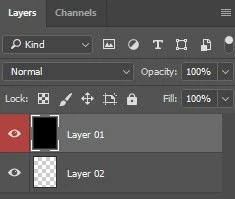
Hello everyone! I need to find a way to perform a task only in layers determined by the red color: It would greatly facilitate a script that checks if there is any layer with the color red in the document. If it exists: Trigger an alert with the message "true!" If it does not exist: Trigger an alert with the message "false" Thanks in advance!

This topic has been closed for replies.
Correct answer c.pfaffenbichler

Hi c.pfaffenbichler! No, I have not found the script yet! I believe there was an error in the translation. The layer filter can be enough yes, it will check and identify if there is any layer with red color and if it exists then it will trigger a "Do something" alert if not "Do nothing".

It would be somewhat similar to this script, it identifies whether the layer is visible or not, in my case, modify to identify whether or not there is layer with red color.

Thanks for listening

#target photoshop 

if ( app.documents.length <= 0 ) alert( "No Image in Use" ); 

else{main();} 


function main(){ 

    var docRef = app.activeDocument; 

    var myLayers=docRef.layers; 


    for(i=0; i<myLayers.length;i++){ 

        if(myLayers.typename=="ArtLayer" && myLayers.visible==true ){ 

            alert("Layer is Visible"); 

             } 

        else if (myLayers.typename=="ArtLayer" && myLayers.visible==false ){ 

            alert("Layer is inVisible"); 

        } 

    } 

}


Does this help?

// 2017, use it at your own risk;

#target photoshop

if (app.documents.length > 0) {

// the file;

var myDocument = app.activeDocument;

// get number of layers;

var ref = new ActionReference();

ref.putEnumerated( charIDToTypeID("Dcmn"), charIDToTypeID("Ordn"), charIDToTypeID("Trgt") );

var applicationDesc = executeActionGet(ref);

var theNumber = applicationDesc.getInteger(stringIDToTypeID("numberOfLayers"));

// process the layers;

var theLayers = new Array;

var theOthers = new Array;

for (var m = 0; m <= theNumber; m++) {

try {

var ref = new ActionReference();

ref.putIndex( charIDToTypeID( "Lyr " ), m);

var layerDesc = executeActionGet(ref);

var layerSet = typeIDToStringID(layerDesc.getEnumerationValue(stringIDToTypeID("layerSection")));

var isBackground = layerDesc.getBoolean(stringIDToTypeID("background"));

// if not layer group collect values;

if (layerSet != "layerSectionEnd" /*&& layerSet != "layerSectionStart"*/ && isBackground != true) {

var theName = layerDesc.getString(stringIDToTypeID('name'));

var theID = layerDesc.getInteger(stringIDToTypeID('layerID'));

var visible = layerDesc.getBoolean(stringIDToTypeID("visible"));

var theColor = layerDesc.getEnumerationValue(stringIDToTypeID("color"));

if (typeIDToStringID(theColor) == "red") {theLayers.push([theName, theID])}

else {theOthers.push([theName, theID])}

};

}

catch (e) {};

};

// if layers are red;

if (theLayers.length > 0) {alert ("there is at least one red layer")}

else {alert ("no red layers")}

};

2 replies

Known Participant
September 8, 2017

c.pfaffenbichler very interesting method of color checking, this will be very useful.

I have searched in this and other community something like this, but replaced color layer method by a value of the "width" size of the current document.

This post has already been answered, I'm going to create a discussion about scripting that I'm looking for.

pixxxelschubser
Community Expert
Community Expert
September 6, 2017

Hi smithcgl9043167​,

some times ago c.pfaffenbichler​ wrote a code for a similar question:

how to hide/show layers depending on layer colour?

Have fun

smithcgl9043167
Inspiring
September 7, 2017

Hi pixxxel schubser I've been working hard to understand scripts. Before my post I researched here and the closest result I found was this example from c.pfaffenbichler, but I confess that I could not understand and make modifications that meet my goals. A simple alert script stating that there is at least one layer of red color in the document already helped me a lot how to proceed.

c.pfaffenbichler
Community Expert
Community Expert
September 7, 2017

Might the Layer Filter not suffice?

A simple alert script stating that there is at least one layer of red color in the document already helped me a lot how to proceed.

So you found such a Script already?

And would a Script selecting all red Layers not make more sense?