Participant
November 8, 2018
Answered

How to choose export to default to Nearest Neighbor?

  • November 8, 2018
  • 1 reply
  • 2210 views

When I updated to Photoshop 2019, the Export resample setting defaults to Bicubic Automatic. It used to keep the setting I had most recently used, which is always Nearest Neighbor (since I'm working on pixel art).

It's super annoying to have to switch that every single time I export a file. Is there a way to set this back to how it used to be? I can't find anything in Export preferences that would fix this.

Thanks!
This topic has been closed for replies.
Correct answer Trevor.Dennis

https://forums.adobe.com/people/Francesco+Della+Peruta  wrote

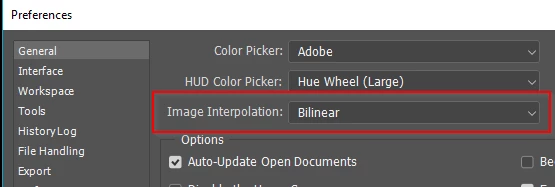
You can specify a default interpolation method to use whenever Photoshop resamples image data. Choose Edit > Preferences > General (Windows) or Photoshop > Preferences > General (Mac OS), and then choose a method from the Image Interpolation Methods menu.

Test it for yourself. 

My Preferences setting

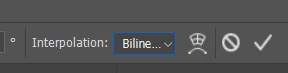
Free Transform

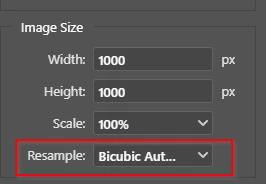
Export As

Change it and use it on a new image, or restart Photoshop, and it is back to Automatic.
Something for the Feedback site perhaps?

Photoshop Family Customer Community

1 reply

Community Expert
November 8, 2018

You can specify a default interpolation method to use whenever Photoshop resamples image data. Choose Edit > Preferences > General (Windows) or Photoshop > Preferences > General (Mac OS), and then choose a method from the Image Interpolation Methods menu.

Trevor.Dennis
Community Expert
Trevor.DennisCommunity ExpertCorrect answer
Community Expert
November 8, 2018

https://forums.adobe.com/people/Francesco+Della+Peruta  wrote

You can specify a default interpolation method to use whenever Photoshop resamples image data. Choose Edit > Preferences > General (Windows) or Photoshop > Preferences > General (Mac OS), and then choose a method from the Image Interpolation Methods menu.

Test it for yourself. 

My Preferences setting

Free Transform

Export As

Change it and use it on a new image, or restart Photoshop, and it is back to Automatic.
Something for the Feedback site perhaps?

Photoshop Family Customer Community

Participant
November 9, 2018

Thank you, that's exactly what I needed!