Participating Frequently
February 7, 2018
Answered

How to close pop-up windows in Photoshop?

  • February 7, 2018
  • 3 replies
  • 10360 views

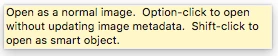
Does anyone know how to make this image/pop-up go away(attached below)?  It's just recently started appearing and I can't close or move it.  It is always infant/on top of everything no matter what else I might be doing on the computer.  I can only make it go away by quitting photoshop.  I've gone through all the settings and viewing windows I can think of.  I'm not sure what else to try.  Any help would be appreciated.
    This topic has been closed for replies.
    Correct answer Norman Sanders

    What version of Photoshop are you using?

    In the Preferences > Interface ... see whether Show Tool Tips is a checkbox choice

    3 replies

    Norman Sanders
    Legend
    February 7, 2018

    Participating Frequently
    February 7, 2018

    This is what mine look like:

    Norman Sanders
    Norman SandersCorrect answer
    Legend
    February 7, 2018

    What version of Photoshop are you using?

    In the Preferences > Interface ... see whether Show Tool Tips is a checkbox choice

    Participating Frequently
    February 7, 2018

    Unfortunately, I don't have tools as an option in my preferences.  I'm on CS^ extended via monthly subscription...

    Norman Sanders
    Legend
    February 7, 2018

    Preferences > Tools ...uncheck Use Rich Tool Tips

    Participating Frequently
    February 7, 2018

    Unfortunately, I don't have tools as an option in my preferences.  I'm on CS6 extended via monthly subscription...