
Participant
July 28, 2022
Answered

How to convert each folder to smart objects in Photoshop using script?

  • July 28, 2022
  • 2 replies
  • 1458 views

Greetings,

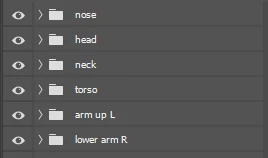
I've been looking for a Photoshop script that could help me batch convert each folder (all folders in Photoshop file) to smart objects separately. You can see the example below. 


Before
After
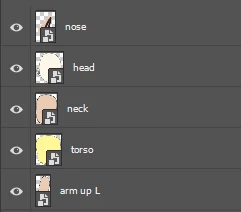
 

Currently, I use keyboard shortcut to convert a folder into a smart object, but this way more exhausting if I must convert a large number of folders into smart objects, because the keyboard shortcut just works for one folder only.

I don't know much about JavaScript. But if you find out the script or the other way more faster please help me to solve this problem.

That's all. Thank you in advance 😄

This topic has been closed for replies.
Correct answer Friskila

The script from @Kukurykus in the first link works on both selected layers and layer groups/sets.


In the second link, the script that I posted works on all top-level layers and layer groups/sets, without requiring a layer to be selected. Also in the second link are two scripts from @jazz-y  that work with selected or all layers/groups.


Thank you very much! I've tried the second link! It works~

2 replies

FriskilaAuthor
Participant
August 1, 2022

Thank you for the information. I've read that. But that applies to layers only.

Stephen Marsh
Community Expert
Community Expert
August 1, 2022

The script from @Kukurykus in the first link works on both selected layers and layer groups/sets.


In the second link, the script that I posted works on all top-level layers and layer groups/sets, without requiring a layer to be selected. Also in the second link are two scripts from @jazz-y  that work with selected or all layers/groups.

c.pfaffenbichler
Community Expert
Community Expert
July 30, 2022

Compliments on posting meaningful screenshots right away! 


Are there Groups in the Groups? 

FriskilaAuthor
Participant
August 1, 2022

Yes, there ae~!

Can Scripts do it?