
LarsHP
Participant
March 29, 2024
Answered

How to create color image from three filtered monochrome images

  • March 29, 2024
  • 2 replies
  • 2205 views

I am trying to find out how to create a color image like astrophotographers do when filtering various wavelengths with a monochrome camera and then blending them together into an RGB image. I understand that it must be some kind of layer work, but how?


Each of the (typically) three monochrome image can be colorized like this: 

Image -> Adjustments -> Channel Mixer -> zero two of the colors for each image.


After the three monochrome images are saved as respectively red, green and blue only images, the idea is to mix these three in layers into a single full color image.


Here is an example where the photographer used some other software, but since I already pay for Adobe CC Photography, I want to use that.


So, what would be a way to mix these three color images into an RGB image?
This topic has been closed for replies.
Correct answer D Fosse

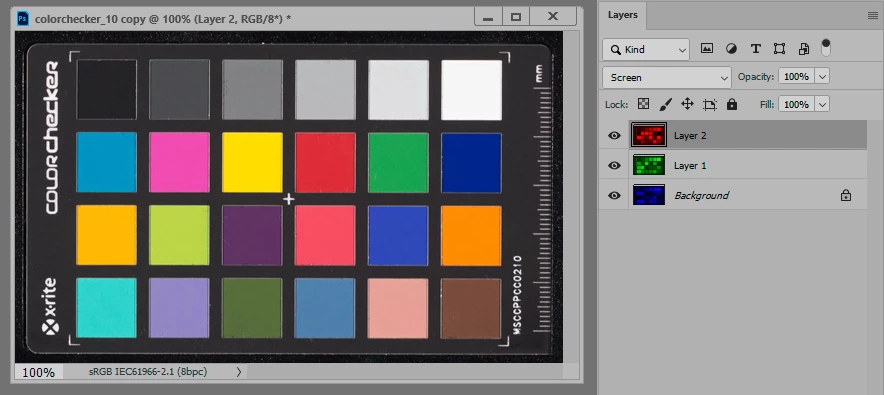
As layers you'd stack them and put them in Screen blend mode.


2 replies

D Fosse
Community Expert
D FosseCommunity ExpertCorrect answer
Community Expert
March 29, 2024

As layers you'd stack them and put them in Screen blend mode.


LarsHP
LarsHPAuthor
Participant
March 30, 2024

Thanks! This suggestion was easy to understand and helpful.

Stephen Marsh
Community Expert
Community Expert
March 29, 2024

Although it could be done with layers, using channels would be easier if each image was suitable.

LarsHP
LarsHPAuthor
Participant
March 30, 2024

Thanks for the suggestion, but I don't understand how using channels alone would create the wanted result? I would of course need to stack the three colorized images first, but when deselecting the respective colors for each layer in the Channels panel, I just get a black image.

Stephen Marsh
Community Expert
Community Expert
March 30, 2024

No need for layers and stacking.


RGB colour images are directly created from RGB channels.


Layers just add an extra unnecessary, indirect abstraction. Most image formats don't support layers, but channels are an intrinsic part of their construction.


Open the three separate files. Copy the green channel data from the green file and paste it into the green channel of the red file. Copy the blue channel data from the blue file and paste it into the blue channel of the red file. Then reselect the primary composite/component RGB channel to view the combined result.


This can be automated into an action if you have to do this on a regular basis.