harshadamarne
Known Participant
February 10, 2020
Question

How to create this effect in Photoshop

  • February 10, 2020
  • 6 replies
  • 1853 views

Hello! I am sort of new to photoshop and really confused as to how should I go about creating the following effect. Any help would be appreciated. Thanks in advance!
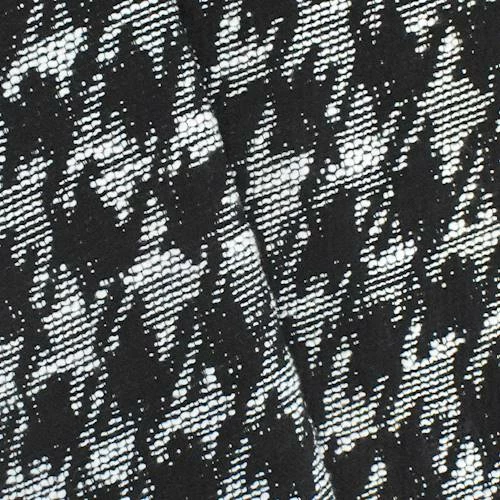

 

This topic has been closed for replies.

6 replies

Jon-M-Spear
Legend
February 11, 2020

In that case, us the image you have!

Jon-M-Spear
Legend
February 11, 2020

Perhaps search online for a photo of a real piece of fabric - or buy a piece and photograph it.


Sometimes the old fashioned way is much more effective that trying to reinvent the wheel.   

harshadamarne
Known Participant
February 11, 2020

Well its not what I am looking to do. I just want to recreate the exact same photo....if that helps. Thanks for all your help though, really appreciate it.

Jon-M-Spear
Legend
February 11, 2020

Search for a stockshot or graphic of a honeycomb or a loose weave cloth and combine it as a separate layer  - changing its blend mode.

harshadamarne
Known Participant
February 11, 2020

Hi...thanks for your response. I tried this but its not working out. 😕😕

c.pfaffenbichler
Community Expert
Community Expert
February 11, 2020

Then you can either try to isolate a part of the image and make it seamless (by warping, touching up the edges etc.) or create a synthetic pattern. 

But what exactly is the important aspect to you? 

Jon-M-Spear
Legend
February 11, 2020

I tried to post a link, but it keeps getting misidentified as spam - and is deleted.


Search for Create Houndstooth pattern in Photoshop -- or similar phrase.  There are tutorials how to make a seamless S&R pattern.


harshadamarne
Known Participant
February 11, 2020

Thanks! I am able to create the pattern but i am just unable to get that particular effect on it. Any further help would be much appreciated. Thanks again!

c.pfaffenbichler
Community Expert
Community Expert
February 11, 2020

What exactly do you mean? 

Jon-M-Spear
Legend
February 11, 2020
PECourtejoie
Community Expert
Community Expert
February 10, 2020

Hello, there is a free extension to photoshop that can help simulate some cloth patterns: https://exchange.adobe.com/creativecloud.details.13165.cloth-texture-generator.html

harshadamarne
Known Participant
February 11, 2020

Thank you...but i am using CS6 ...dont think its compatible with it. Is there any other way? Thanks again!