Participant
January 15, 2021
Question

how to design text on uniform shirt

  • January 15, 2021
  • 2 replies
  • 235 views

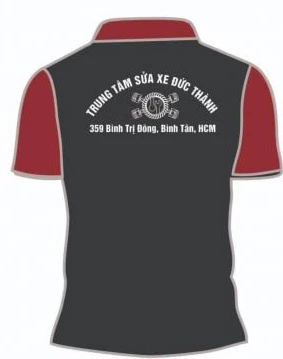
Hi, I use Photoshop to design the word [link to website removed by moderator] "Xuong may dong phuc"" on the uniform shirt with an arc as shown below.

This topic has been closed for replies.

2 replies

Norman Sanders
Legend
January 15, 2021

An alternate option, depending upon your degree of proficiency and the importance of an appearance of authenticity would be to search Google images for a white tee shirt that has modeling rather than a flat tone. I don’t mean creases but the hills and valleys of a shirt that is not the flat tone or skin tight.

Choose that surface, accent the modeling tonal values and use it to add modelling to the shirt as well as in the Displacement Technique so that the typography and logo take on the bends of the surface displayed in the Google image. 

melissapiccone
Community Expert
Community Expert
January 15, 2021

You can use text on a path. You create the path, either using a circle or the pen tool, then you can add type to the path. https://www.photoshopessentials.com/basics/type-path-photoshop/

Melissa Piccone | Adobe Trainer | Online Courses Author | Fine Artist