Answered
How to determine a clipping mask layer
How to determine if there is a layer with a clipping mask above the currently selected shape layer in Photoshop.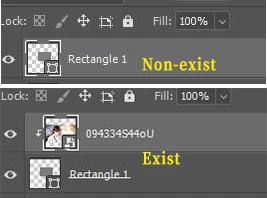

How to determine if there is a layer with a clipping mask above the currently selected shape layer in Photoshop.
There is this:
/*
https://www.ps-scripts.com/viewtopic.php?f=66&t=9103&sid=98c4d82b0eb4484b8c106956a1bccb75
*/

function isClippingLayer(){
var ref = new ActionReference();
ref.putEnumerated( charIDToTypeID('Lyr '),charIDToTypeID('Ordn'),charIDToTypeID('Trgt') );
var desc = executeActionGet(ref);
var idx = desc.getInteger (stringIDToTypeID('itemIndex'));
var group = desc.getBoolean(stringIDToTypeID('group'));
var clipInfo=false;
if(group) clipInfo = 'topClippingLayer';
try{
activeDocument.backgroundLayer;
IDX = idx;
}catch(e){IDX = ++idx;}
try{
    var ref = new ActionReference();
   ref.putIndex(charIDToTypeID( 'Lyr ' ), IDX );
   desc =  executeActionGet(ref);
    }catch(e){return clipInfo;}
    group = desc.getBoolean(stringIDToTypeID('group'));
    if(group && clipInfo == 'topClippingLayer' ) clipInfo = 'middleClippingLayer';


    if(group && clipInfo === false ) clipInfo = 'bottomClippingLayer';
    return clipInfo;
}

alert(isClippingLayer());
And this:
/*
https://www.ps-scripts.com/viewtopic.php?f=66&p=171837
by Kukurykus
*/

sTT = stringIDToTypeID;
iI = (aL = (aD = activeDocument).activeLayer).itemIndex, prnt = aL.parent.id; function grouped(v) {
	(ref = new ActionReference()).putIndex(sTT('layer'), v);
	return (dsc = executeActionGet(ref)).getBoolean(sTT('group')) && ((id = dsc.getInteger(sTT('parentLayerID')))  < 0 || id == prnt);
}
while(aL.grouped) {
	if (!grouped(--iI)) (ref = new ActionReference()).putIndex(sTT('layer'), iI),
	(dsc = new ActionDescriptor()).putReference(sTT('null'), ref), executeAction(sTT('select'), dsc), Function('break');
}
Already have an account? Login
Enter your E-mail address. We'll send you an e-mail with instructions to reset your password.
 AdChoices